README.md
Rama main · réplica de lectura del repositorio original.
# MakerPulse - Docker Container
Self-hosted **MakerWorld** creator analytics. Track likes, collections, prints, downloads, comments, boosts, followers, and estimated points — per published model and as account totals. Optional Telegram summaries. English UI.
[](https://github.com/leon199219/makerpulse/actions/workflows/image.yml)
[](https://github.com/leon199219/makerpulse/pkgs/container/makerpulse)
[](LICENSE)
**Image:** `ghcr.io/leon199219/makerpulse:latest` · [Changelog](CHANGELOG.md)

| Models | Statistics |
| --- | --- |
|  |  |
| Activity | Settings |
| --- | --- |
|  |  |
## Features
- Polls **public** MakerWorld data — no Creator Center login
- Totals **and** per-model history
- Period picker: `1h`, `4h`, `8h`, `24h`, `7D`, `30D`, `90D`, `ALL`
- Activity feed with type filters
- Optional **Telegram** bot (hourly / 6h / daily / weekly)
- JSON API for Home Assistant / Grafana (`GET /api/stats`)
- Reset tracking data from Settings
- Single Docker service + Postgres
Not affiliated with Bambu Lab or MakerWorld. Points are **estimated** from public stats (`prints × 2 + boosts`, +25% on exclusive models).
---
## (Other project) : Hardware companion
Want the same stats on a desk display? **[MakerPulse-CYD](https://github.com/leon199219/MakerPulse-CYD)** runs on a Cheap Yellow Display ([ESP32-2432S028](https://github.com/witnessmenow/ESP32-Cheap-Yellow-Display)): Telegram on change, MQTT backlight for Home Assistant. No Docker on the ESP — it talks to MakerWorld itself.
[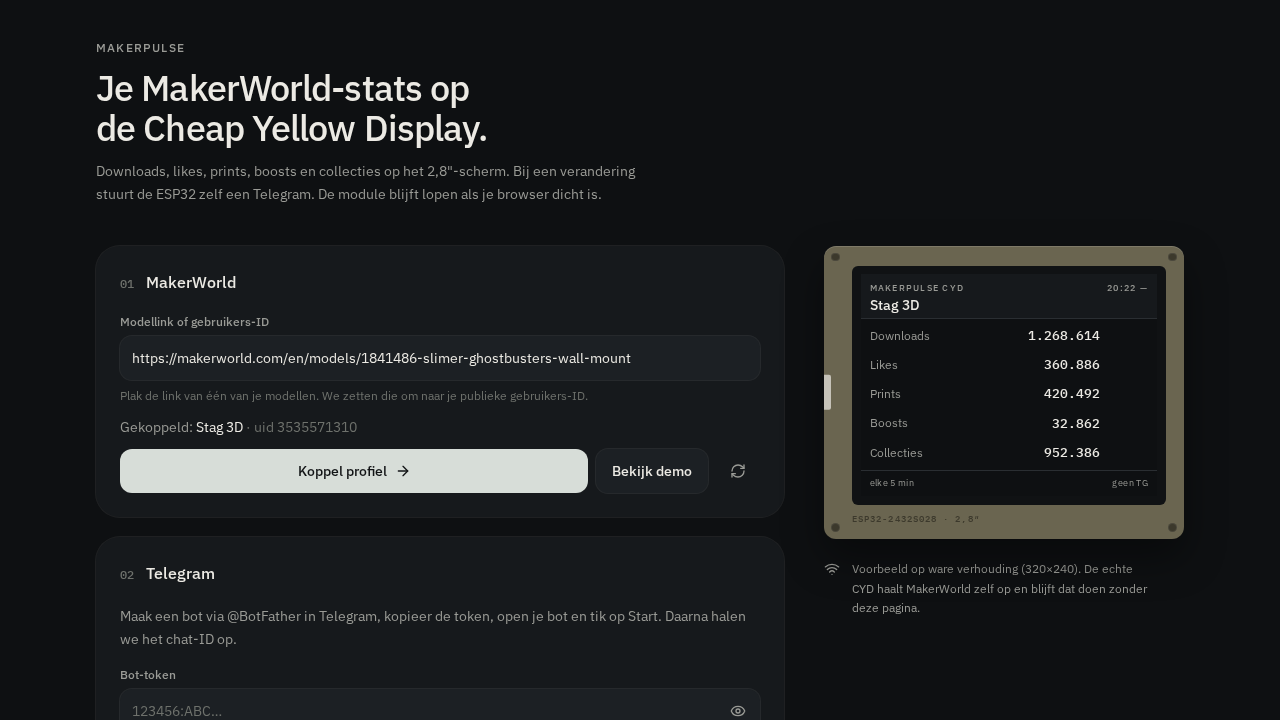](https://github.com/leon199219/MakerPulse-CYD)
The dashboard and the CYD are independent. Run one, the other, or both.
---
## Quick start - MakerPulse Docker Compose
No source tree required. Use the published image.
```yaml
services:
makerpulse:
image: ghcr.io/leon199219/makerpulse:latest
pull_policy: always
restart: unless-stopped
ports:
- "8080:8080" # host:container — keep 8080 on the right
environment:
DATABASE_URL: postgres://makerpulse:makerpulse@db:5432/makerpulse
POLL_INTERVAL_MINUTES: "30"
depends_on:
db:
condition: service_healthy
db:
image: postgres:16-alpine
restart: unless-stopped
environment:
POSTGRES_USER: makerpulse
POSTGRES_PASSWORD: makerpulse
POSTGRES_DB: makerpulse
volumes:
- makerpulse-data:/var/lib/postgresql/data
healthcheck:
test: ["CMD-SHELL", "pg_isready -U makerpulse -d makerpulse"]
interval: 5s
timeout: 5s
retries: 10
volumes:
makerpulse-data:
```
```bash
docker compose up -d
```
Open the UI on port `8080`. In **Settings**, paste a MakerWorld user ID or a model URL.
**Ready-made file:** [docker-compose.image.yml](docker-compose.image.yml)
The image name **must** include the registry:
```yaml
image: ghcr.io/leon199219/makerpulse:latest # correct
# image: makerpulse:latest # looks on Docker Hub → pull denied
```
---
## Update
```bash
docker compose pull makerpulse
docker compose up -d --force-recreate makerpulse
```
Do **not** use `docker compose down -v` — that deletes Postgres history.
Pushes to `main` publish a new `:latest` via GitHub Actions.
---
## Add to an existing Compose stack
Reuse your Postgres. Keep `8080` as the container port.
```yaml
makerpulse:
image: ghcr.io/leon199219/makerpulse:latest
pull_policy: always
restart: unless-stopped
ports:
- "3001:8080"
environment:
DATABASE_URL: postgres://USER:PASSWORD@postgres:5432/DATABASE
POLL_INTERVAL_MINUTES: "30"
depends_on:
- postgres
```
`postgres` in `DATABASE_URL` is the **Compose service name**, not `localhost`.
More detail (source build, reverse proxy, troubleshooting): [INSTALL.md](INSTALL.md).
---
## Environment
| Variable | Required | Description |
| --- | --- | --- |
| `DATABASE_URL` | Yes | Postgres URL (`user:pass@service:5432/db`) |
| `MAKERWORLD_UID` | No | Numeric MakerWorld user ID (or set in Settings) |
| `POLL_INTERVAL_MINUTES` | No | Starting value only (`30`). After you save Settings, the app uses that interval |
| `TELEGRAM_BOT_TOKEN` | No | From [@BotFather](https://t.me/BotFather) |
| `TELEGRAM_CHAT_ID` | No | Chat or group ID |
| `TELEGRAM_CADENCE` | No | Starting value only: `hourly`, `every_6h`, `daily`, or `weekly`. After you save Settings, that choice is used |
| `CRON_SECRET` | No | Protects `GET /api/cron` |
| `MAKERPULSE_PORT` | No | Host port for the standalone compose file (default `8080`) |
Creator and Telegram can always be configured in **Settings**.
---
## Telegram
1. Create a bot with [@BotFather](https://t.me/BotFather).
2. Message the bot, then get your chat ID (e.g. `@userinfobot`).
3. Paste token + chat ID in Settings, enable updates, send a test.
---
## HTTP API
| Endpoint | Purpose |
| --- | --- |
| `GET /api/health` | Liveness `{ "ok": true, "service": "makerpulse" }` |
| `GET /api/stats` | Current totals and 24h deltas (Home Assistant / Grafana) |
| `GET /api/cron` | Trigger a poll (`CRON_SECRET` if set) |
---
## Settings
- Connect a creator (numeric UID or `https://makerworld.com/…/models/…`)
- Poll interval
- Telegram bot
- **Reset tracking data** — clears snapshots/events and takes a fresh baseline (demo data mixed with your account)
---
## Build from source
```bash
git clone https://github.com/leon199219/makerpulse.git
cd makerpulse
docker compose up -d --build
```
Or `docker build -t makerpulse:local .` and point Compose at that tag.
---
## License
[MIT](LICENSE)
MakerWorld and Bambu Lab are trademarks of their respective owners.