README.md
Rama main · réplica de lectura del repositorio original.
# unmask
> **The bot challenge that respects search engines.**
> Proof-of-work first, a CAPTCHA only when it looks automated.
Website: **https://unmask.sh/**
[](https://github.com/unmask-sh/unmask/actions/workflows/ci.yml)
[](LICENSE)
[](https://github.com/unmask-sh/unmask/releases)
[](https://go.dev/)
[](https://unmask.sh/install/)
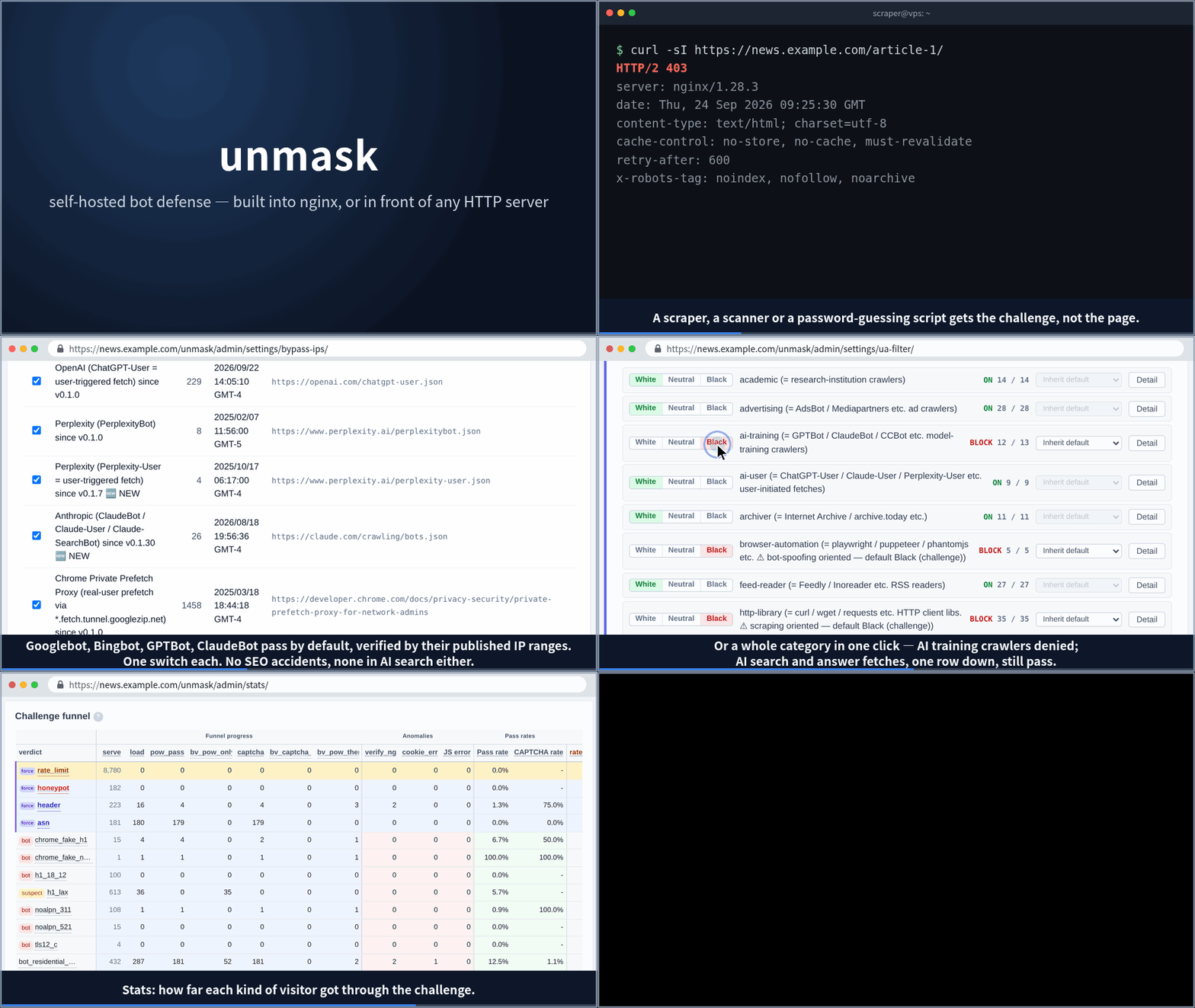
**unmask** is a self-hosted bot management gateway for nginx: a dynamic
module in the nginx you already run, or a gateway container in front of any
other HTTP server. (An Apache integration through `mod_lua` also ships. It
is the forward-auth path, which is frozen: bug and security fixes only, no
JA4 fingerprint, and new features are not added to it.)
It layers signals -- the JA4 TLS fingerprint, the network (ASN), the
country, the request rate, honeypot paths and a shared ban list -- and
answers with a challenge that grows with suspicion: a proof-of-work that runs by itself
for ordinary visitors, its own behavioral CAPTCHA when a visit looks
automated or matches a rule you set, and a block only where you choose one.
Search and AI crawlers pass by default, verified by their published IP
ranges wherever the vendor publishes them.
## Features
- **Challenges that grow with suspicion** — Ordinary visitors clear a proof-of-work in the background, with no click. The proof-of-work is a cost, not a test: a bot that loads the page and runs its JavaScript solves it too. It turns away the plain HTTP fetchers that never do, and what bounds the rest is the budget on what a pass is used for (per pass and per address) and the rate limits. A visit that looks automated, or matches a rule you set, goes on to a built-in behavioral CAPTCHA (a 5-axis score from mouse trail / scroll / keyboard / window size / click position; no third-party service, no site key -- or Cloudflare Turnstile, hCaptcha or reCAPTCHA v3 in its place). Blocking is opt-in. The challenge page carries your logo and speaks 18 languages.
- **Two-stage search-bot rescue** — UA list + official IP range double-check. Designed not to break Googlebot / GPTBot / ClaudeBot. One click refuses AI training crawlers while AI search fetches still pass.
- **Layered signals** — The JA4 TLS fingerprint (ban a tool, not just an address), network (ASN), country, request rate, honeypot paths and User-Agent rules.
- **Community Bans** — Anonymous BAN feed shared across installs. 5-tier confidence score combines heuristic + AI judge. Pulling the shared list is ON by default and enforced as a challenge (proof-of-work, then CAPTCHA; a block only if you choose one), so a mismatched human still passes; set `subscribe_mode: off` to disconnect. Submitting your own reports is opt-in (country is tagged by default — opt out in settings). GDPR by design: the hub keeps reporting installs' addresses only as per-day salted hashes, scrubbed after 30 days.
- **Built-in admin UI** — dashboard / hunt / abuse signals / settings. argon2id password hashes + cookie session + CSRF + per-IP login rate-limit.
- **Two ways to deploy** — the native nginx dynamic module (~0.05 ms post-cookie), or the gateway container, which puts nginx with the module in front of any HTTP server (Apache, Node, anything).
- **Web Bot Auth + Privacy Pass (opt-in)** — RFC 9421 HTTP Message Signatures (ed25519 / RSA-PSS) and Privacy Pass / Apple PAT (RFC 9577/9578). Signed AI agents (Anthropic / OpenAI / etc.) and attested clients pass through without a challenge. Off by default behind an Advanced switch, since the ecosystem is still small.
## Install
The install guide takes you through either way, step by step: **https://unmask.sh/install/**
- **Running nginx?** Use the native module — the recommended setup. Signed rpm / deb / apk packages for x86_64 and arm64 put it into the nginx you already run, and an install wizard does the rest.
→ https://unmask.sh/install/
- **Apache, Node or anything else — or you would rather run a container?** The gateway image, `unmask.sh/unmask`, is the official nginx image with the module plus the daemon in one container, placed in front of your server (served from unmask.sh, mirrored on GHCR).
→ https://unmask.sh/install/#gateway
### Requirements
- **nginx**, one of the 15 versions the plugin package bundles a module
for (1.10.3 up to 1.30.6; the install guide lists them), built
`--with-compat` (the distributions' packages are -- Alpine's own from
3.23 on -- and so are nginx.org's; a self-built nginx needs the flag).
The plugin places the module built for
exactly the version `nginx -v` reports, for the host's OpenSSL
generation: nginx loads no other, a neighbouring patch release included.
When none matches, the plugin says which version is missing and what to
do, and leaves nginx running without unmask rather than failing to start;
`unmask doctor` and the admin's notification list report it until a
module is in place. Pin the nginx package to a bundled version (`dnf
versionlock`, `apt-mark hold`) where the distribution's updates would
move it off the list.
An nginx built from source -- by hand, or by a hosting panel that
compiles its own, aaPanel for one -- runs the module too, when it is one
of those versions and built `--with-compat` (a panel: the custom
parameters of its nginx build). unmask edits nothing of such an nginx:
it keeps the module and its include files in directories of its own and
names the two `include` lines to add to that nginx's `nginx.conf`.
When that nginx is built again -- another version, a panel's reinstall --
unmask takes its module out the moment the binary changes, so that the
new build starts with whatever `nginx.conf` it is given, and puts it back
when nginx's service starts with the two lines in place.
Install `unmask-nginx-external` first there -- it tells the package
manager that the host has an nginx no package installed, so that the
plugin does not bring in the distribution's beside it.
- **OS**: RHEL / Rocky / AlmaLinux, Debian, Ubuntu and Alpine, on x86_64
and arm64; the packages are installed on ten distributions before a
release. On Alpine 3.22 and older, Alpine's own nginx package is built
without `--with-compat` and refuses the module (the plugin then leaves it
out and says so): use nginx.org's package there, or Alpine 3.23.
Anything else runs the gateway container.
- **Database**: SQLite by default, a file under `/var/lib/unmask`, nothing
to set up; or MariaDB (`db.driver: mariadb`). PostgreSQL is not
supported.
- **HTTP/3**: the JA4 fingerprint is read from the TLS handshake, which
nginx's QUIC layer hides from the module unless nginx is 1.29.0 or newer
on OpenSSL 3.5.1 or newer (or quictls). On other builds HTTP/3
connections carry no JA4 and the JA4-based decisions do not apply to
them; HTTP/1.1 and HTTP/2 are unaffected, and `unmask doctor` says
whether this host is concerned.
- **Behind a load balancer or a CDN**, nginx must see the visitor's
address: enable the vendor's preset under Settings › Network › Trusted
LB / CDN and "Take the visitor's address from X-Forwarded-For (realip)".
Otherwise every visitor shares the proxy's address, and so do the rate
limits and bans.
- **Several nodes** share the `secret` section of config.yml; the budgets
count per node. "Several nodes" below has the rest.
- **Cost**: the module adds about 0.05 ms to a request that carries a
pass. The rendered configuration is a few thousand lines of `map`
blocks nginx reads at reload, and the rate-limit zones take 10 MB of
shared memory each (five by default).
### Quick start (nginx, native module)
About ten minutes from a shell on the host.
1. Install `unmask-release`, the repository definition and the signing keys.
RHEL / Rocky / AlmaLinux:
`sudo dnf install -y https://unmask.sh/dl/rpm/unmask-release-latest.noarch.rpm`.
Debian / Ubuntu: download https://unmask.sh/dl/deb/unmask-release-latest.deb,
then `sudo apt install ./unmask-release-latest.deb && sudo apt update`.
Alpine: download https://unmask.sh/dl/apk/unmask-release-latest.apk, then
`sudo apk add --allow-untrusted ./unmask-release-latest.apk && sudo apk update`
(this one package carries the key; only it is installed unverified, and
every package after it is checked against the key it installed).
2. `sudo dnf install unmask unmask-plugin-nginx unmask-web-nginx`
(`apt install` / `apk add`, same names): the daemon with the admin UI, the
nginx module, and the nginx snippets. The plugin's postinstall places the
`load_module` line, or says where to add it.
3. Add `include /var/lib/unmask/nginx/server.inc;` to the `server { }` block
of the site, then `sudo nginx -t && sudo systemctl restart nginx`: a
restart, not a reload, because nginx loads a module only when it starts
(the plugin's install output says the same).
4. Open `https://<your-host>/unmask/admin/setup/` and paste the setup token
the install printed (`sudo cat /var/lib/unmask/.setup-token`).
5. Protect a location: `include /var/lib/unmask/nginx/protect.inc;` inside
its `location { }`, then `sudo nginx -t && sudo systemctl reload nginx`
(a reload is enough from here on: only a changed module needs a
restart, and the admin says which).
6. See it work: `curl -sS -o /dev/null -w '%{http_code}\n' https://<your-host>/<that path>`
answers 403 (the challenge page) to a client that holds no pass and runs
no JavaScript, a browser clears the proof-of-work and gets the page, and
the admin's Bot hunt page shows both requests and why.
The gateway container instead: `docker compose -f docker-compose.example.yml up -d`,
then the wizard at `https://localhost/unmask/admin/` (the token is in
`docker compose logs unmask`). A load balancer in front, per-server examples
and the rest are in the install guide. Moving an existing install to a newer
release: [UPGRADING.md](UPGRADING.md).
Content-Security-Policy: the challenge page is served in place of the page the
visitor asked for, so an `add_header Content-Security-Policy` in the
`server { }` block reaches it too, and a browser enforces every policy it
receives. The daemon sends a policy of its own with each challenge page (a
per-page nonce for the page's inline scripts, `blob:` workers for the
proof-of-work, the origin of the CAPTCHA provider you picked); a site policy
that allows neither `'unsafe-inline'` scripts nor `blob:` workers stops the
page, since the site cannot know the nonce. Set the site's header inside the
`location { }` blocks it is meant for, or leave the `/unmask/` location without
one.
### Uninstall
1. `sudo dnf remove unmask unmask-plugin-nginx unmask-web-nginx`
(`apt remove` / `apk del`, same names). The removal takes the module and
its `load_module` out of nginx again, lists the lines of your own
configuration that still include unmask's files, and prints what
`nginx -t` says. It does not reload or restart nginx.
2. Remove those lines from your `server { }` blocks: the two from the quick
start, `include /var/lib/unmask/nginx/server.inc;` and
`include /var/lib/unmask/nginx/protect.inc;`. nginx does not load its
configuration while they are there.
3. `sudo nginx -t && sudo systemctl restart nginx`.
What stays: `/etc/unmask` (config.yml, with its secrets), `/var/lib/unmask`
(the database, the rendered files) and the `unmask` user, for a reinstall to
pick up. Delete them by hand when they are no longer wanted.
### Configuration
`/etc/unmask/config.yml` is the one place settings live: the admin UI
writes it on save (comments do not survive), `unmask doctor` checks it,
`unmask config-init` writes a starting one. Its sections, each a tab of
the settings page:
- `db` (driver, location), `secret` (`bv_secret` behind every pass, `sig_hash`),
`server` (listener, `host_id`), `nginx_log` (the socket nginx's log arrives on);
- `challenge` -- `default` and per-site values: proof-of-work difficulty, pass
windows, monitor mode (`observe_only`), the CAPTCHA (`captcha.provider`), branding;
- `nginx` -- what the rendered configuration says: trusted LB / CDN ranges and
realip, the admin's hosts and addresses, bypass lists, `honeypot`, `custom_rules`,
`metrics_allow_from`;
- `rate_limit` (the zones, the reuse cap on a pass), `community_bans`,
`notifications`, `smtp`, `ai_advisor`, `ipgeo`, `outbound`, and the
`*_retention_days` of events, the audit log and the notifications.
An unknown key is named at startup and ignored; [UPGRADING.md](UPGRADING.md)
lists what each release adds, renames or removes.
### Several nodes
Behind a load balancer, every node that verifies passes for a site holds
the same `secret` section (`bv_secret`, `captcha_secret_base`): copy it, or
the whole config.yml, to each node, and each daemon renders its own nginx
configuration from it. A pass then verifies on any node, so the load
balancer needs no sticky sessions. Bans, statistics and the admin's
accounts live in the database: nodes sharing one MariaDB share them, and
the admin tells them apart by `server.host_id` (the hostname unless set);
nodes with their own SQLite each keep their own, and a ban made on one is
not known to the others. Rate-limit budgets are counted per node, in
nginx's shared memory, so the total behind a load balancer is that many
times the figure. The install guide has the load balancer's side: the
visitor's address, and the JA4 fingerprint where TLS ends in front of nginx.
### Monitoring
`/unmask/metrics` serves Prometheus text: `unmask_event_total`, the events
each daemon has written since it started, by phase and verdict (a counter:
take `rate()` or `increase()` of it), the unique addresses of the last 24
hours, the CAPTCHA score histogram, and the gauges an alert should watch --
`unmask_db_up` (the daemon has its database), `unmask_native_failsafe_active`
(the plugin's fail-safe stripped the module: nginx runs without unmask),
`unmask_nginx_config_stale` (a render waits for a reload),
`unmask_ban_file_worker_readable` (nginx can read the ban list),
`unmask_schema_update_pending`, and the `*_dropped_total` counters of the
log and event intake. It answers loopback only until
`nginx.metrics_allow_from` names your Prometheus. The `unmask` package
ships a Grafana dashboard and example alerting rules for these under
`/usr/share/unmask/grafana/` (`dashboards/` in this repository).
Two probes need no Prometheus. `/unmask/healthz` answers 200 for as long as
the daemon runs: the one for a load balancer's health check.
`/unmask/readyz` answers 200 once the daemon has its database and 503 while
it runs without one. A daemon started while its database was away (a host
that boots it ahead of MariaDB) keeps serving the challenge, retries the
database, and starts over by itself when it answers; statistics, new bans
and the admin UI wait until then.
### The built-in CAPTCHA, and a provider in its place
The built-in CAPTCHA scores what the browser reports about the visit --
mouse trail, scroll, keyboard, window size, where the click landed -- and
asks nothing of the visitor beyond a checkbox. That is also its limit: a
client that runs the page's JavaScript can send a plausible report, so this
stage sorts scripts from browsers rather than bots from people, and what
bounds a client that gets through is the same as after the proof-of-work:
the budget on what a pass is used for, the rate limits and the bans. Where
the CAPTCHA stage has to hold against scripted browsers -- a sign-up form,
an endpoint worth automating -- put Cloudflare Turnstile, hCaptcha or
reCAPTCHA v3 in its place: `captcha.provider` with the provider's site and
secret keys, on the settings page (which warns before a change that could
lock you out of the admin; the challenge page's policy admits the
provider's origin).
### Package signing
Every package (rpm / deb / apk) is signed; `unmask-release` installs the public
keys, and the package manager verifies everything from then on. Fingerprints
for bootstrapping trust by hand (cross-check with https://unmask.sh/keys/):
- OpenPGP, rpm / deb (`RPM-GPG-KEY-unmask`):
`C03D D45E 28C4 446F DDC4 8EFC 34A3 20B5 44B2 8158`
- Alpine RSA, apk (`unmask.rsa.pub`), SHA-256 of the DER public key:
`63:77:6a:f3:57:b7:be:aa:db:2a:83:67:9d:ae:46:42:ac:78:6d:ad:49:95:9b:7c:1f:cb:3d:16:5c:c9:a5:dc`
The raw binaries, the SBOM and the container image of a release are built
by the release workflow, which attests their provenance:
`gh attestation verify unmask-linux-amd64 --repo unmask-sh/unmask` (or
`oci://ghcr.io/unmask-sh/unmask:<version>`) checks a download against it.
The packages are built and signed locally; their provenance is the
signature above.
## Docs
Official docs: **https://unmask.sh/docs/**
Choosing a deployment (native module or gateway container), JA4 behind a load balancer, per-server config examples, FAQ.
This README keeps the requirements and the first ten minutes; [UPGRADING.md](UPGRADING.md) what each release asks and how to roll back; [SECURITY.md](SECURITY.md) the threat model.
## What it stores
For every request it judges, the daemon records the address, the
User-Agent, the JA4 fingerprint, the host and path, and the verdict: as a
raw event kept 7 days by default (`events_retention_days`, the retention
tab; 0 keeps everything), and in hourly aggregates kept 32 days. Bans stay
until they expire or you lift them; admin accounts and the audit log (its
own retention) until you remove them. Everything is on the host, in the database you
chose.
Outbound, by default, the daemon fetches from unmask.sh the update check,
the shared ban list (with the install's registration), the crawler IP
ranges and the browser-version list; each can be switched off (About tab,
Community Bans tab). Submitting your own reports to Community Bans and the
AI advisor are opt-in.
## Contributing
See [CONTRIBUTING.md](CONTRIBUTING.md).
## Status
**Released.** Signed rpm / deb / apk for x86_64 + arm64, the gateway container image,
an install wizard, and both ways to deploy (the native nginx module and the gateway
container) are shipping. It runs in production on the author's own sites.
Still 0.x: a release can rename or remove a settings key, and most ask nginx
for a reload or a restart; [UPGRADING.md](UPGRADING.md) lists each one.
Security reports (see [SECURITY.md](SECURITY.md)) get priority response.
Bug reports, documentation fixes, and PRs are reviewed regularly.
## License
Apache 2.0. See [LICENSE](LICENSE) / [NOTICE](NOTICE).