README.md
Rama main · réplica de lectura del repositorio original.
<div align="center">
<img src="https://raw.githubusercontent.com/mineco-de/Paragrafy/main/paragrafy.svg" width="88" alt="Paragrafy logo" />
# § Paragrafy
**Multi-Project Legal CMS & Compliance Engine**
Self-hosted headless backend for managing, translating, and publishing legal boilerplate — imprint, privacy policy, terms & conditions, cookie policies — across any number of web and app projects.
[](LICENSE)
[](CHANGELOG.md)
[](#)
[](#)
[](#-docker-setup--deployment)
[](https://github.com/mineco-de/Paragrafy/stargazers)
[Website](https://paragrafy.cloud) · [Live Demo](https://demo.paragrafy.cloud/admin) · [Documentation](https://docs.paragrafy.cloud) · [Changelog](CHANGELOG.md)
</div>
---
## Why Paragrafy?
If you run more than one website or client project, you already know the pain: the same imprint, privacy policy, and terms of service scattered across a dozen repos, in a dozen slightly-out-of-sync versions, in one language, with no idea when they were last checked.
Paragrafy centralizes all of that in a single lightweight PHP + SQLite backend. One instance, many domains — each gets its own legal texts, languages, and branding, served through a clean JSON API, an embeddable widget, or a polished public viewer.
Built for agencies, SaaS operators, and anyone who maintains legal pages for more than one project.
> Versioning follows **CalVer** (`YEAR.MONTH.BUILD`, e.g. `2026.9.1`) instead of SemVer, so you can tell at a glance how current an instance is. See [CHANGELOG.md](CHANGELOG.md) for release notes.
---
## Screenshots
<!-- TODO: swap in real screenshots from paragrafy.cloud/assets/ — dashboard, public viewer, editor, settings -->
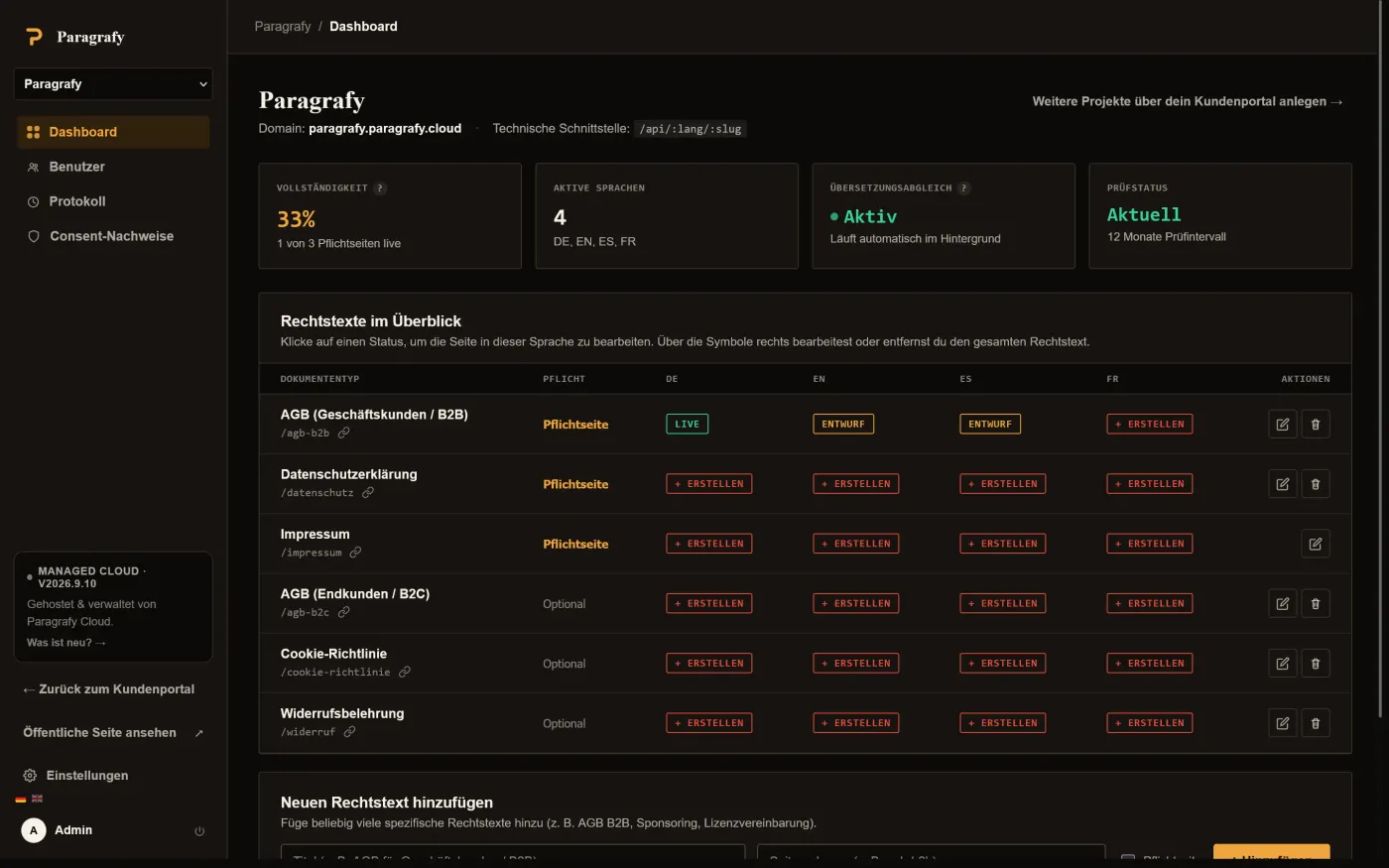
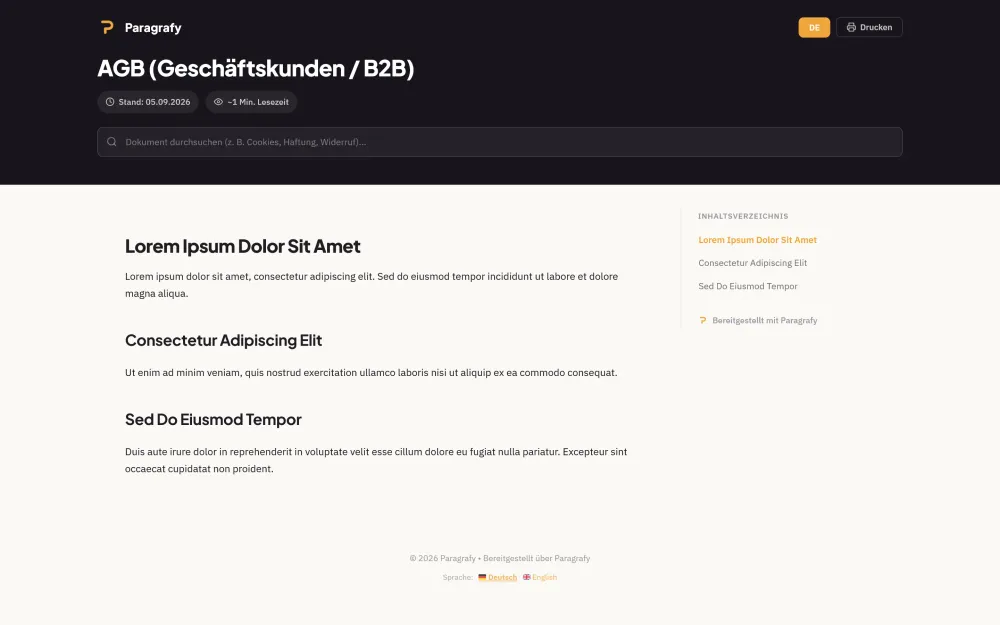
| Compliance Dashboard | Public Viewer |
|---|---|
|  |  |
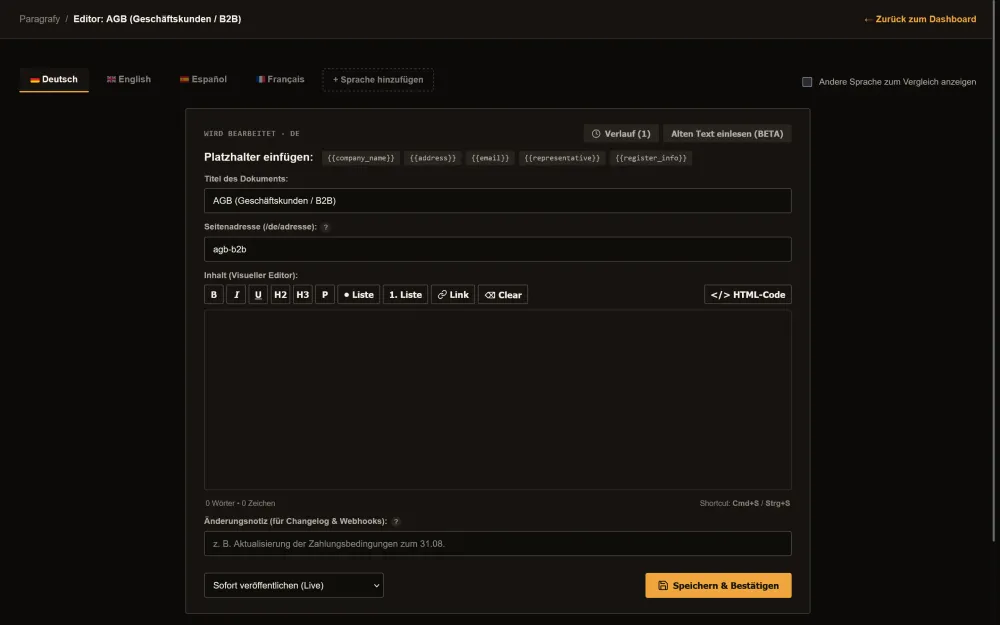
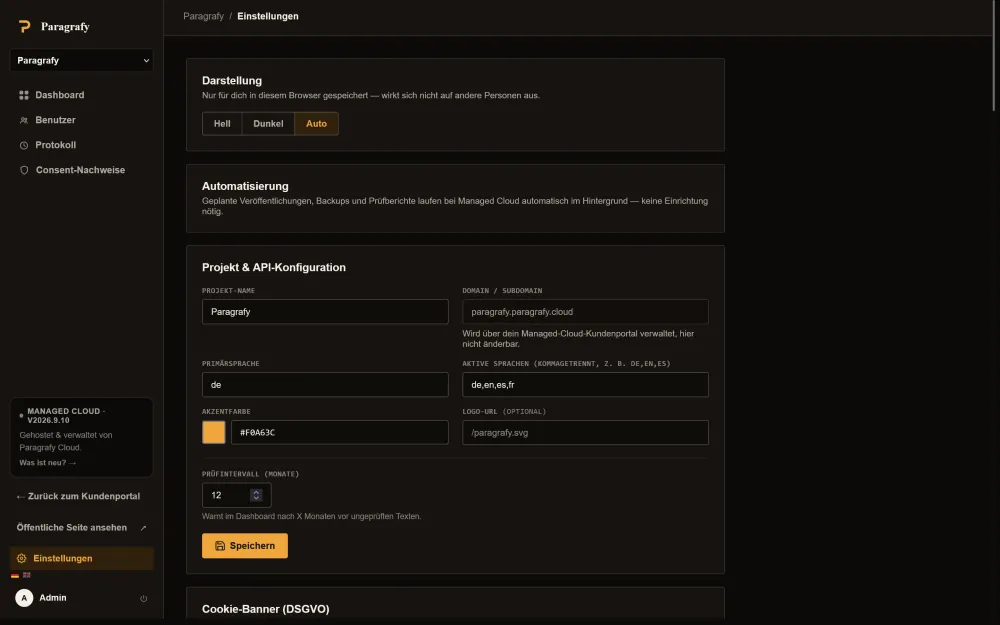
| Editor with Language Tabs | Settings & Cron Endpoints |
|---|---|
|  |  |
👉 Try it live: **[demo.paragrafy.cloud/admin](https://demo.paragrafy.cloud/admin)** (no username, password 12345678 - freely configurable, resets every 10 minutes).
---
## ✨ Key Features
- **Multi-tenant / multi-domain routing** — detects the calling subdomain (`legal.yourdomain.com`, `legal.project-b.com`) and serves the matching project's legal texts, colors, and company data automatically.
- **Compliance matrix with one-click toggle & copy-URL** — the admin dashboard shows at a glance which required texts exist in which languages (`DE`, `EN`, `ES`, `FR`, …), which are drafts, and which are missing, with instant toggles and one-click copy for every language URL.
- **Scheduled publishing** — plan changes to your terms or privacy policy ahead of time with an effective date; the current version stays live until the deadline and is swapped automatically.
- **Full-featured webhooks** — with queue, retry, and delivery logs. Notifies connected apps via `POST` on go-live (`legal_text.updated`) and upcoming changes (`legal_text.scheduled`, including a `preview_url`). Delivery runs asynchronously through a queue with automatic retry (up to 5 attempts, increasing backoff), so a slow receiver never blocks saving. See [WEBHOOKS.md](WEBHOOKS.md) for the full spec.
- **Public preview of scheduled changes** — a scheduled, not-yet-live version is viewable ahead of time at `/{lang}/{slug}/preview` (and as JSON), e.g. to notify users in advance of upcoming ToS changes.
- **Automatic rolling backups (7 days)** — a cron endpoint backs up the database daily and prunes older copies; the latest backups can be downloaded individually from settings.
- **Full WYSIWYG & code editor** — a visual formatting toolbar (H2, H3, bold, italic, lists, links) with one-click toggle to raw HTML.
- **Bidirectional DeepL translation** — translate any source text with protected placeholders (e.g. `DE → EN`, `EN → DE`, `ES → DE`) directly in the side-by-side editor.
- **Automatic version sync (hash-diff)** — when a source text changes, Paragrafy flags every other language version as `⚠ Outdated`, with a built-in diff viewer (green = added, red = removed).
- **Audit & deadline tracking with SMTP email** — get warned when texts haven't been reviewed within a configurable interval (e.g. 12 months), with optional email audit reports.
- **Headless JSON API & in-app embed drawer** — endpoints under `/api/:lang/:slug`, plus a modal sheet script (`/embed.js`) for dropping legal text straight into your web apps.
- **GDPR cookie consent banner** — a lightweight, dependency-free consent script (`/consent.js`).
- **Consent proof logging** — optional, server-side proof-of-consent log per decision: timestamp, action, anonymized IP, browser, and a hash of the displayed banner text. Exportable as CSV, with configurable retention.
- **Notion/Stripe-style public viewer** — sticky table of contents with scroll-spy, reading time estimate, deep-link anchors, and live text filtering across all target languages.
- **Backups & exports** — download a full database backup or all published legal texts as a sorted ZIP archive (by language/slug) from settings.
- **Unlimited custom document types** — go beyond the standard required pages and add project-wide documents (e.g. B2B terms, sponsorship agreements, license terms), optionally flagged as required.
- **Multi-user management with email invites** — invite as many people as you like via email; they set their own password through an activation link. Every invited user gets full admin access — no roles or permissions to configure. Self-service "forgot password" included.
- **Audit trail with CSV export** — a dedicated log tab shows who changed what and when — project settings, document types, publications, and user management — downloadable as CSV.
- **Version history with diff & restore** — every publish creates a new version. The editor shows full version history per language, including a diff against the current version and a non-destructive restore.
- **Language tabs in the editor** — active languages appear as tabs, with an optional side-by-side comparison view against a reference language.
- **Dark mode** — light/dark/auto toggle in settings, stored per browser, with no effect on other users or public legal pages.
- **Login protection** — failed login attempts are throttled per IP address (5 attempts / 15 minutes) to slow down brute-force attacks.
- **Optional Two-Factor Authentication (TOTP)** — any user account (and, self-hosted, the admin account) can enable RFC 6238 two-factor auth with QR-code setup and one-time recovery codes. See [Two-Factor Authentication (TOTP)](#-two-factor-authentication-totp) below.
- **HTTP caching for public legal texts** — the public viewer and JSON API send `ETag`/`Last-Modified`/`Cache-Control` and answer unchanged requests with `304 Not Modified`, so a traffic spike on a linked customer site doesn't hit the database on every request. An optional per-project file cache skips full re-rendering entirely for documents that haven't changed; previews are always excluded and served `private, no-store`.
- **Multilingual fallbacks** — if a visitor requests a language a document hasn't been translated into yet (e.g. `/fr/impressum` with only `DE`/`EN` published), the public viewer, JSON API, and overview page automatically fall back to English, then the project's primary language, then whichever single language exists — instead of a 404. The served page shows a clear notice with the requested language, the overview marks affected entries with a small language badge, and the JSON API adds `fallback: true` / `requested_lang` so integrations can detect it too.
---
## 🏗️ How It Fits Together
```
┌────────────────────────────┐
│ Paragrafy │
│ (PHP + SQLite, 1 instance)│
└─────────────┬────────────────┘
│
multi-domain routing by subdomain
│
┌──────────────┬──────────┴──────────┬──────────────┐
▼ ▼ ▼ ▼
legal.project-a legal.project-b legal.project-c legal.project-d
(DE / EN) (DE / FR) (DE / ES) (DE only)
│ │ │ │
└── JSON API, embed.js, consent.js, webhooks → your websites & apps
```
One Paragrafy instance can serve an unlimited number of projects, each with its own domain, languages, branding, and document set — this is what makes it a good fit for agencies managing legal pages across many client sites.
---
## 📁 Project Structure
```
/var/www/paragrafy/
├── index.php # Public router, viewer, JSON API & cron handler
├── admin.php # Admin dashboard, compliance matrix, webhook logs & settings
├── editor.php # Language-tab editor with scheduled publishing & version history
├── install.php # Interactive setup wizard for first installation
├── db.php # SQLite connection, migrations, webhooks, SMTP client & theming
├── totp.php # TOTP two-factor auth: crypto, enrollment, verification, config locking
├── bin/
│ ├── totp-reset-admin.php # Server-access-only emergency reset for a locked-out self-hosted admin
│ └── check-translations.php # CI helper: keeps lang/*.php key sets in sync
├── composer.json / composer.lock # TOTP dependencies (spomky-labs/otphp, endroid/qr-code)
├── vendor/ # Composer dependencies (not committed — run `composer install`)
├── assets/fonts/ # Self-hosted webfonts (Fraunces, Inter, JetBrains Mono) for admin/editor
├── Dockerfile # Container image definition
├── docker-compose.yaml # Docker Compose setup for container operation
├── docker-entrypoint.sh # Fixes file permissions on the data volume at container start
├── WEBHOOKS.md # Detailed webhook documentation, spec & payloads
├── paragrafy.svg # Vector logo
├── .htaccess # Apache routing & protection of sensitive files
├── config.php # Admin password hash, cron secret & TOTP encryption key (generated during setup)
├── .env.local # Optional: DEEPL_API_KEY fallback
├── backups/ # Rolling 7-day backups (created automatically)
└── paragrafy_data.sqlite # SQLite database (created automatically)
```
With Docker, `config.php`, `.env.local`, `backups/`, and `paragrafy_data.sqlite` live under `PARAGRAFY_DATA_DIR` instead — `/var/www/data` inside the container (deliberately *outside* the `/var/www/html` docroot so nothing there is ever web-reachable), mounted to `./data` on the host.
---
## 🚀 Getting Started
### Option A: Docker (recommended)
```bash
# Clone the full repository (not just the Docker files!)
git clone https://github.com/mineco-de/Paragrafy.git
cd Paragrafy
# Build and start the container
docker compose up -d --build
# Then open the setup wizard in your browser
https://your-domain.example/install.php
```
The image is built from your local checkout (`COPY . /var/www/html/` in the Dockerfile) — it doesn't pull code from GitHub itself, so `docker compose up -d --build` reliably reflects your current state instead of getting stuck on an old layer cache.
**Persistence:** `docker-compose.yaml` mounts `./data` to `/var/www/data` (outside the Apache docroot) and sets `PARAGRAFY_DATA_DIR=/var/www/data` — this is where `paragrafy_data.sqlite`, `config.php`, `/backups`, and an optional `.env.local` live. Without this volume, your database and admin credentials are lost on every `--build`. The container automatically sets correct file permissions on this folder at startup (via `docker-entrypoint.sh`), even if the host directory didn't previously exist.
> **Upgrading an existing self-hosted Docker install:** versions built before 2026-09-08 used `/var/www/html/data` (inside the docroot) as the container path. The host-side `./data` folder is unchanged, so a plain `git pull` + `docker compose up -d --build` picks up the new, safer container path automatically — no manual data migration needed.
### Option B: Apache / bare metal
**1. Upload files, install dependencies & set permissions**
```bash
composer install --no-dev --optimize-autoloader
sudo chown -R www-data:www-data /var/www/paragrafy
sudo find /var/www/paragrafy -type d -exec chmod 755 {} +
sudo find /var/www/paragrafy -type f -exec chmod 644 {} +
```
`composer install` pulls in the TOTP two-factor auth libraries (`spomky-labs/otphp`,
`endroid/qr-code`) into `vendor/` (not committed to the repo). Requires the PHP `sodium` and
`gd` extensions — both are bundled with a stock PHP 8.2 install; `gd` may need
`apt install php8.2-gd` on some distros. Without `vendor/` present, everything else keeps
working — only the TOTP setup screen under **Admin → Security** shows a "not installed" hint
instead of the QR code.
**2. Apache VirtualHost**
```apache
<VirtualHost *:80>
ServerName legal.yourdomain.com
ServerAlias legal.project-b.com
DocumentRoot /var/www/paragrafy
<Directory /var/www/paragrafy>
AllowOverride All
Require all granted
</Directory>
ErrorLog ${APACHE_LOG_DIR}/paragrafy_error.log
CustomLog ${APACHE_LOG_DIR}/paragrafy_access.log combined
</VirtualHost>
```
`PARAGRAFY_DATA_DIR` is not needed here — the database and config live directly in the project folder, as usual (the bundled `.htaccess` denies direct HTTP access to `*.sqlite*`, `config.php`, and `.env*` as a safety net).
> **Multi-tenant hosting note:** Paragrafy resolves which project to serve from the request's `Host` header against the `projects.domain` column — this is what lets one instance serve several customer domains. Make sure your webserver only routes requests for domains you've actually registered to this vhost (no catch-all/default vhost pointing here); otherwise a request with a spoofed `Host` header sent straight to the server's IP could resolve to a project it shouldn't.
### First run
Open your subdomain in the browser (e.g. `https://legal.yourdomain.com`). The **Paragrafy setup wizard** launches automatically and creates the database, admin password, and a random cron secret.
---
## ⏱️ Cron Jobs
These endpoints should be called regularly from outside so scheduled publications go live, backups are created, and webhooks get delivered. All are protected by a secret key (`?secret=...` query parameter), which you'll find pre-assembled under **Settings → Automation (Cron)** — and can regenerate there if needed.
```bash
# Publish scheduled changes (every minute, across all projects)
* * * * * curl -fsS "https://legal.yourdomain.com/api/cron/publish?secret=YOUR_CRON_SECRET" > /dev/null
# Process the webhook queue (every 5 minutes)
*/5 * * * * curl -fsS "https://legal.yourdomain.com/api/cron/webhooks?secret=YOUR_CRON_SECRET" > /dev/null
# Daily rolling backup (7 days retention)
0 3 * * * curl -fsS "https://legal.yourdomain.com/api/cron/backup?secret=YOUR_CRON_SECRET" > /dev/null
# Email audit report if any legal texts are overdue (daily)
0 8 * * * curl -fsS "https://legal.yourdomain.com/api/cron/audit?secret=YOUR_CRON_SECRET" > /dev/null
# Optional: rotate old public file-cache entries (the cache also rotates itself opportunistically)
0 4 * * * curl -fsS "https://legal.yourdomain.com/api/cron/cache-cleanup?secret=YOUR_CRON_SECRET" > /dev/null
```
An external uptime monitor (e.g. Uptime Kuma, healthchecks.io) works just as well as a "cron" here, as long as it calls these URLs on the desired interval.
Paragrafy is usable without cron configured, too: scheduled publications are also checked automatically whenever someone visits the relevant project domain (zero-config fallback) — though with very low traffic this can delay going live. Backups and the webhook queue can be triggered manually from settings at any time. An endpoint called without or with an incorrect `secret` responds with HTTP 403.
---
## ⚙️ Configuration & Environment Variables
Most settings (SMTP credentials, webhook URL/secret, DeepL API key, company data, cookie banner text, accent color, etc.) are **per-project** and live in the SQLite database — managed entirely through the settings UI in the admin area, not via environment variables or config files.
Only the following values actually come from files instead of the database:
| File / Variable | Purpose |
| --- | --- |
| `config.php` (auto-generated) | Admin password hash (legacy login) and the cron secret. Created by the setup wizard — don't edit manually. Optional: `project_limit` (int) caps the number of `projects` rows for this instance; if unset (default), there's no limit. Useful for operators running Paragrafy behind their own SaaS/billing layer with one instance per account/plan. Also self-heals a `totp_encryption_key` (random, generated on first TOTP setup, same pattern as the cron secret) used to encrypt TOTP secrets at rest — never edit or share this value, it's not a secret you're meant to configure. On self-hosted instances (no `sso_secret`), also holds the admin account's own optional `admin_totp_*` fields if 2FA is enabled for it — see [Two-Factor Authentication (TOTP)](#-two-factor-authentication-totp) below. |
| `.env` / `.env.local` (optional) | `DEEPL_API_KEY=...` as a cross-project fallback if a project has no DeepL key of its own configured. Both files are optional — everything works without them except this fallback. |
| `PARAGRAFY_DATA_DIR` (env variable) | Docker only: relocates `config.php`, the SQLite database, `/backups`, and `.env.local` into a persistent directory. See [Getting Started](#-getting-started) above. |
| `PARAGRAFY_PUBLIC_CACHE` (env variable, optional) | Set to `0` to disable the optional public file-cache under `PARAGRAFY_DATA_DIR/cache/public/` (defaults to `1`/on). HTTP validation caching (`ETag`/`Last-Modified`/`304`) is unaffected and always active. |
---
## 🔐 API Access & Authentication
- The **public JSON API** (`/api/:lang/:slug`) is intentionally **unauthenticated and read-only** — legal texts should be retrievable from any connected website without credentials. There's no way to write or modify content through this API.
- **Editing legal texts** is only possible through the logged-in `/admin` session (password or multi-user login) — there's no separate bearer-token/API-key API for write access.
- **Cron endpoints** (`/api/cron/...`) require the `?secret=` query parameter described above (or an active admin session) and trigger server actions (backup, webhook delivery, publishing, audit email) — but never expose content or credentials.
---
## 🔒 Two-Factor Authentication (TOTP)
Optional, per-account TOTP (RFC 6238) under **Admin → Security**, on top of the password:
- **Regular user accounts** can always enable it — scan the QR code with any authenticator app (Google Authenticator, Aegis, 1Password, …), confirm with a live code before it's persisted, then save the 10 one-time recovery codes shown once. Recovery codes can be regenerated any time; disabling 2FA requires re-entering your password.
- **The one admin account** (password-only, no email/username) can enable it too, but **only on self-hosted instances without SSO configured** (no `sso_secret` in `config.php`) — on Managed Cloud, admin access is enforced through SSO from the SaaS dashboard instead (see [Self-Hosted vs. Managed Cloud](#-self-hosted-vs-managed-cloud)), so a TOTP-protected password path there would guard an entrance nobody uses. If you want TOTP-protected day-to-day access on Managed Cloud, create a regular user account for that instead — the primary admin account stays reserved for SSO.
- **Admin-side reset** (Admin → Users → the 2FA badge on a row) lets the primary admin reset a *regular user's* TOTP if they lose their device and their recovery codes — the affected user gets a notification email, and the reset is written to the audit log.
- **The admin account has no reset-by-someone-else path** (nobody stands above it), so if a self-hosted admin loses their device *and* all recovery codes, the only way back in is `php bin/totp-reset-admin.php` — deliberately a server-access-only CLI command, not a web UI, since a web-reachable admin-TOTP reset would let anyone holding a stolen admin session strip 2FA without proving they actually have shell access to the box.
- TOTP secrets are encrypted at rest (`sodium_crypto_secretbox`, key self-healed into `config.php` on first use); recovery codes are stored password-hashed, never in plaintext, and shown to you only once at generation time.
---
## 🔧 Integrations
### Webhooks
Two event types for automating workflows in your frontends:
- `legal_text.scheduled` — advance notice of a planned change (including effective date).
- `legal_text.updated` — a document goes live (immediately or on its effective date).
Full payloads, HMAC signature verification, and code examples: **[WEBHOOKS.md](WEBHOOKS.md)**.
### Headless JSON API
```
GET https://legal.yourdomain.com/api/en/privacy-policy
GET https://legal.yourdomain.com/api/terms-b2c
```
Both this endpoint and the public HTML viewer send `ETag`/`Last-Modified`/`Cache-Control: public, max-age=300, must-revalidate` and answer a matching `If-None-Match` with `304 Not Modified` — so a caching HTTP client only re-fetches the body when a document actually changed. (`Last-Modified` is sent for informational purposes but isn't accepted as a validator on its own — only `If-None-Match`/`ETag` can produce a `304`, since a language fallback response's freshness isn't reliably expressed by a date alone.)
If a document isn't translated into the requested language yet, the response falls back to another available language instead of a `404` — see [Multilingual fallbacks](#-key-features) above. In that case the JSON response adds `"fallback": true` and `"requested_lang"` alongside the usual fields, and `"lang"` reflects the language actually served.
### In-app embed drawer (`/embed.js`)
```html
<script src="https://legal.yourdomain.com/embed.js"></script>
<button data-paragrafy-slug="privacy-policy" data-paragrafy-lang="en">Show Privacy Policy</button>
```
### GDPR cookie consent banner (`/consent.js`)
```html
<script src="https://legal.yourdomain.com/consent.js"></script>
```
**Consent proof logging** — simply embedding the banner does not by itself trigger a server-side log; consent logging must be enabled per project under **Settings → Consent Proof**. Once active, `/consent.js` sends an additional fire-and-forget request to `/api/consent-log` on every "Accept"/"Necessary only" click, creating a proof record containing:
- timestamp and action (accepted/rejected)
- an **anonymized** IP address (last octet zeroed for IPv4, last 80 bits zeroed for IPv6) — the full IP is never stored
- browser (`User-Agent`)
- a random consent ID (also stored in the website's `localStorage` as `paragrafy_consent_id`, for correlation)
- a SHA-256 hash of the banner text shown at that time (proof of *what* was accepted)
Viewable and exportable as CSV under **Admin → Consent Proof** (`/admin/consent-log`). A retention period in days can be configured under **Settings → Consent Proof** (default: 1095 days / ~3 years, `0` = unlimited); expired entries are cleaned up automatically during the daily rolling-backup cron (`/api/cron/backup`) — no extra cron job needed.
> This is a technical aid for record-keeping, not legal advice — whether and how long retention makes sense or is required for your specific case should be reviewed individually.
---
## ⬆️ Upgrading
Updates are straightforward — schema changes run automatically on the first request after updating:
1. **Before updating:** create a backup (Settings → Backup & Export, or back up `/backups` for Docker).
2. **Apache:** copy new files over the old ones, or `git pull` — don't overwrite/delete `config.php`, `paragrafy_data.sqlite`, or `/backups`. Then run `composer install --no-dev --optimize-autoloader` (see [bare-metal setup](#option-b-apache--bare-metal) above) — needed since the 2FA release to pull in the TOTP libraries; harmless to re-run on every update either way.
**Docker:** `git pull` in your local checkout first, then `docker compose up -d --build` — the image is built from local code, so `--build` alone without a prior `git pull` still uses the old state. `config.php`, `paragrafy_data.sqlite`, `/backups`, and `.env.local` are preserved automatically via the `data` volume. `composer install` runs automatically as part of the image build, nothing to do manually.
3. On the next page load, `ensure_schema_migrations()` automatically creates any missing tables and columns (e.g. `users`, `audit_log`, `translation_versions`, `webhook_queue`, `sso_nonces`, TOTP columns on `users`, new columns on `projects`) — no manual migration script needed.
4. Existing installations without a `cron_secret` in `config.php` get one generated automatically on the first call to a `/api/cron/...` endpoint (visible under Settings → Automation). Same self-healing pattern for `totp_encryption_key`, generated the first time anyone sets up 2FA.
There have been no breaking changes to date that require manual intervention beyond the automatic migration.
---
## 🌐 Self-Hosted vs. Managed Cloud
Paragrafy is fully open source (AGPL-3.0) and free to self-host with the complete feature set — no paywalled functionality. If you'd rather not run your own server, [paragrafy.cloud](https://paragrafy.cloud) offers a managed cloud version with hosting, automatic backups, and support plans starting at a single project.
| | Self-Hosted | Managed Cloud |
|---|---|---|
| Cost | Free, forever | From €7.99/month |
| Feature set | Full | Full (identical for user accounts) |
| Admin account access | Password login, optionally + TOTP | SSO from the SaaS dashboard (password login disabled, no TOTP needed) |
| Infrastructure | Your own server, Docker or bare metal | Hosted for you, incl. SSL |
| Data ownership | Fully yours | Yours, hosted by Paragrafy |
| Support | Community (GitHub) | Included |
Learn more: [Hosting & Pricing](https://paragrafy.cloud/#pricing)
---
## 📚 Documentation
Full documentation, guides, and API reference: **[docs.paragrafy.cloud](https://docs.paragrafy.cloud)**
---
## 🤝 Contributing
Issues and pull requests are welcome. If you're planning a larger change, please open an issue first to discuss the approach. See [CONTRIBUTING.md](CONTRIBUTING.md) for local setup and commit message conventions ([Conventional Commits](https://www.conventionalcommits.org/), e.g. `fix(cookie-banner): use per-locale text`).
Found a security vulnerability? Please don't open a public issue — see [SECURITY.md](SECURITY.md) for a discreet way to report it.
## 📄 License
Paragrafy is licensed under the [AGPL-3.0](LICENSE).
## 🔗 Links
- Website: [paragrafy.cloud](https://paragrafy.cloud)
- Live demo: [demo.paragrafy.cloud](https://demo.paragrafy.cloud)
- Documentation: [docs.paragrafy.cloud](https://docs.paragrafy.cloud)
- Changelog: [CHANGELOG.md](CHANGELOG.md)
- Webhook spec: [WEBHOOKS.md](WEBHOOKS.md)
- Contributing: [CONTRIBUTING.md](CONTRIBUTING.md)
- Security policy: [SECURITY.md](SECURITY.md)