README.tr.md
Rama main · réplica de lectura del repositorio original.
<h2>Open WebUI</h2>
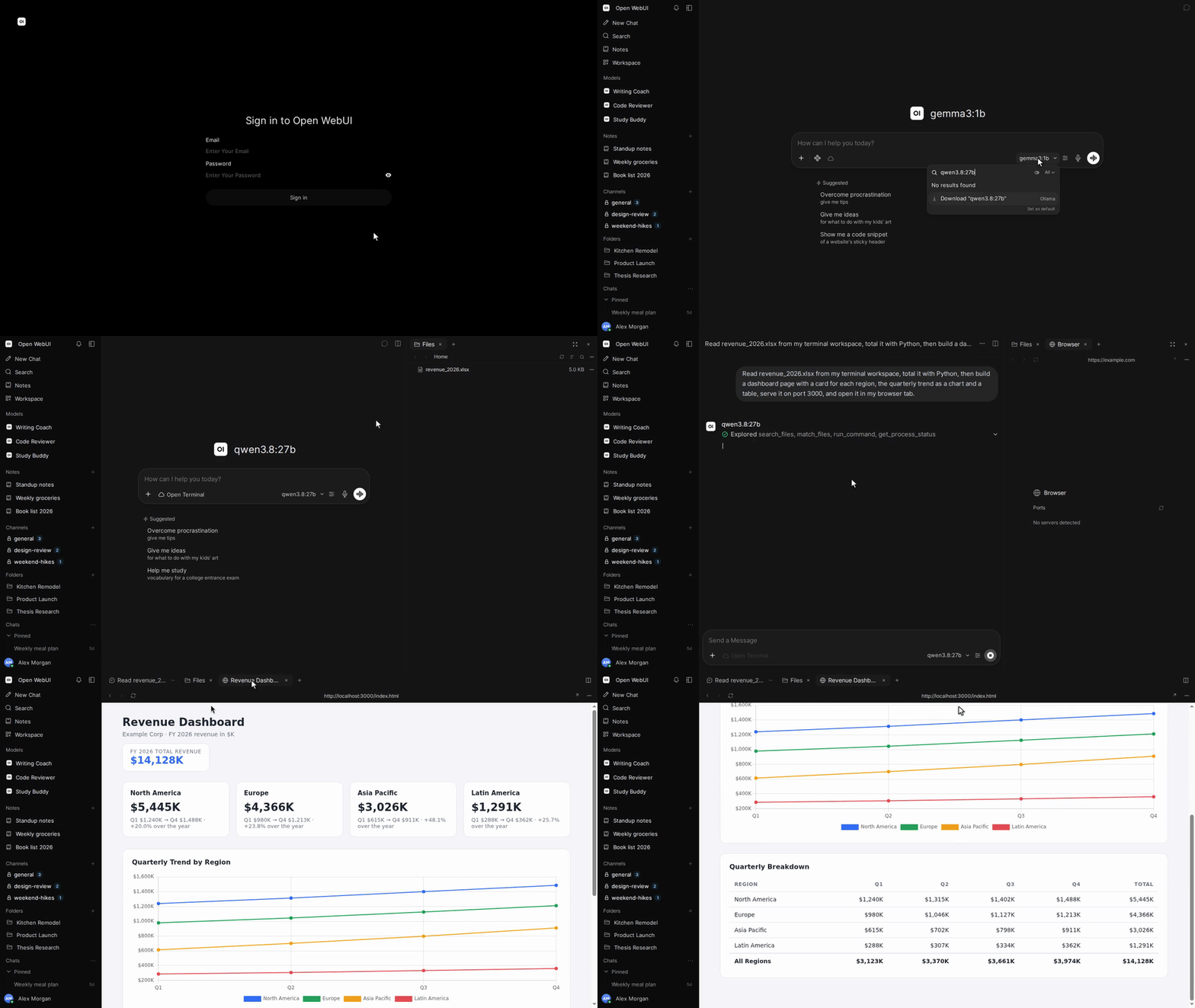
<p>Open WebUI, <a href="https://docs.openwebui.com/"><strong>yapay zekâ için bir yuva</strong></a>dır: tamamen çevrimdışı çalışmak üzere tasarlanmış, genişletilebilir, kullanımı kolay ve kendi sunucunuzda barındırabileceğiniz bir platform. Yerel modellere Ollama üzerinden bağlanın veya yerel ve bulut modelleri için OpenAI uyumlu API’leri kullanın.</p>
[English](README.md) |
[简体中文](README.zh.md) |
[繁體中文](README.zht.md) |
[한국어](README.ko.md) |
[Deutsch](README.de.md) |
[Español](README.es.md) |
[Français](README.fr.md) |
[Italiano](README.it.md) |
[Dansk](README.da.md) |
[日本語](README.ja.md) |
[Polski](README.pl.md) |
[Русский](README.ru.md) |
[Bosanski](README.bs.md) |
[العربية](README.ar.md) |
[Norsk](README.no.md) |
[Português (Brasil)](README.br.md) |
[ไทย](README.th.md) |
[Türkçe](README.tr.md) |
[Українська](README.uk.md) |
[বাংলা](README.bn.md) |
[Ελληνικά](README.gr.md) |
[Tiếng Việt](README.vi.md)
[](https://docs.openwebui.com/)


[](https://discord.gg/5rJgQTnV4s)
[](https://github.com/sponsors/open-webui)
[Open WebUI’ı keşfedin →](https://docs.openwebui.com/)
### Kurulum
#### Python
Python 3.12 gerektirir.
```bash
pip install open-webui
open-webui serve
```
Ardından [http://localhost:8080](http://localhost:8080) adresini açın.
#### Docker
```bash
docker run -d -p 3000:8080 --add-host=host.docker.internal:host-gateway -v open-webui:/app/backend/data --name open-webui --restart always ghcr.io/open-webui/open-webui:main
```
Ardından [http://localhost:3000](http://localhost:3000) adresini açın.
| İmaj etiketi | İçerik |
| ------------ | --------------------------------------------------------------------------------- |
| `:main` | Yerel yapay zekâ bağımlılıklarını içeren standart imaj |
| `:slim` | Gömme vektörleri, belge çıkarımı ve ses için harici hizmetler kullanan hafif imaj |
| `:cuda` | CUDA hızlandırmalı Open WebUI |
| `:ollama` | Ollama ile birlikte gelen Open WebUI |
| `:dev` | En son geliştirme derlemesi |
Gerektiğinde bu seçenekleri `docker run` komutunda imaj adından önce ekleyin:
| Seçenek | Amaç |
| ---------------------------------------------------- | --------------------------------------------------------------------------------------------------- |
| `-e OLLAMA_BASE_URL=http://your-ollama-server:11434` | Başka bir sunucudaki Ollama’ya bağlanma |
| `-e OPENAI_API_KEY=your_secret_key` | OpenAI API anahtarınızı ayarlama |
| `-e HF_HUB_OFFLINE=1` | Çevrimdışı kullanım için Hugging Face model indirmelerini devre dışı bırakma |
| `--gpus all` | `:cuda` veya `:ollama` için Nvidia GPU erişimini etkinleştirme; Nvidia Container Toolkit gerektirir |
Kurulum adımları ve yapılandırma seçenekleri için [Docker kurulum kılavuzuna](https://docs.openwebui.com/getting-started/quick-start/) bakın.
#### Masaüstü uygulaması
macOS, Windows ve Linux için [yerel masaüstü uygulamasını indirin](https://github.com/open-webui/desktop).
[Belgeleri okuyun →](https://docs.openwebui.com/getting-started/)
### Ekosistem
- [Open Terminal](https://github.com/open-webui/open-terminal) / [Terminals (Enterprise)](https://github.com/open-webui/terminals): Open WebUI’ı eksiksiz bir ajan çalışma ortamına dönüştüren yürütme katmanı; kullanıcıya özel çalışma alanları için kurumsal orkestrasyon sunar.
- [Knowledge Base Sync (oikb)](https://github.com/open-webui/oikb): Klasörleri, depoları, nesne depolama kovalarını ve vikileri artımlı eşitleme ile Open WebUI bilgi tabanlarına yansıtın.
- [Open WebUI Computer](https://github.com/open-webui/computer): Bilgisayarınız her tarayıcıda: dosyalar, düzenleyici, terminal, Git ve isteğe bağlı yapay zekâ ajanları kendi gerçek makinenizde çalışır.
Ayrıntılar için [ekosistem belgelerine](https://docs.openwebui.com/ecosystem/) bakın.
### Sorun giderme ve güncellemeler
Bağlantı sorunları için [sorun giderme kılavuzuna](https://docs.openwebui.com/troubleshooting/), kurulumunuzu güncellemek için [güncelleme kılavuzuna](https://docs.openwebui.com/getting-started/updating) bakın.
### Belgeler
Yapılandırma ve kullanım için [belgelere](https://docs.openwebui.com/), planlanan çalışmalar için [yol haritasına](https://docs.openwebui.com/roadmap/) bakın.
Docker Compose, Kubernetes ve diğer kurulumlar için [kurulum belgelerine](https://docs.openwebui.com/getting-started/) bakın.
### Destek
[Bir issue açın](https://github.com/open-webui/open-webui/issues) veya [tartışma başlatın](https://github.com/open-webui/open-webui/discussions).
Bizi [Reddit](https://www.reddit.com/r/OpenWebUI/), [X](https://x.com/OpenWebUI) ve [Discord](https://discord.gg/5rJgQTnV4s) üzerinde bulabilirsiniz.
### Güvenlik
Güvenlik açıklarını [GitHub Security Advisories](https://github.com/open-webui/open-webui/security) üzerinden gizli olarak bildirin. Güvenlik bildirimleri yalnızca GitHub üzerinden kabul edilir.
### Yıldız geçmişi
<a href="https://star-history.com/#open-webui/open-webui&Date">
<picture>
<source media="(prefers-color-scheme: dark)" srcset="https://api.star-history.com/svg?repos=open-webui/open-webui&type=Date&theme=dark" />
<source media="(prefers-color-scheme: light)" srcset="https://api.star-history.com/svg?repos=open-webui/open-webui&type=Date" />
<img alt="Yıldız geçmişi grafiği" src="https://api.star-history.com/svg?repos=open-webui/open-webui&type=Date" />
</picture>
</a>
#### Lisans
Open WebUI markasının korunmasını gerektiren Open WebUI License kapsamındaki kodu ve kendi özgün lisanslarına tabi önceki katkıları içerir. Koşullar ve geçmiş için [LICENSE](./LICENSE) ve [LICENSE_HISTORY](./LICENSE_HISTORY) dosyalarına bakın.
[Kurumsal](https://docs.openwebui.com/enterprise) · [Kariyer](https://careers.openwebui.com/) · [Sponsor olun](https://github.com/sponsors/open-webui)
Geliştiren: [Timothy Jaeryang Baek](https://github.com/tjbck).