README.md
Rama main · réplica de lectura del repositorio original.
[![Release][release-shield]][release]
![Project Stage][project-stage-shield]
[![License][license-shield]][license]
[![Contributors][contributors-shield]][contributors]
[![Issues][issues-shield]][issue]
[![Stargazers][stars-shield]][stars]
# Nginx Proxy Manager CLI Script v3.6.9 🚀
## Description
`npm-api.sh` is a single-file Bash CLI that drives [Nginx Proxy Manager](https://github.com/NginxProxyManager/nginx-proxy-manager) through its REST API: everything you do in the web UI, scriptable from the terminal, cron or CI.
- 🌐 **Hosts**: create, update, enable/disable, delete proxy, redirection, stream (TCP/UDP) and dead (404) hosts
- 🔒 **SSL**: Let's Encrypt certs, wildcard via DNS challenge (Cloudflare, OVH, Route53…), download, purge
- 🛡️ **Access**: access lists (IP allow/deny, basic auth) and user management
- 🤖 **Scriptable**: `--json` on read commands for `jq`, `-y` for non-interactive runs, proper exit codes
- 🔑 **Zero token hassle**: tokens generated, cached and renewed automatically
- 💾 **Backup**: exports the full config (hosts, certs, ACLs, users, settings) as JSON
- 📦 **Minimal deps**: `curl` + `jq`, nothing else
> [!TIP]
> 🤖 **For scripters:** add the global `--json` flag to any read command (`--host-list`, `--host-show`, `--cert-list`, `--cert-show`, `--redirect-host-list`, `--stream-host-list`, `--dead-host-list`, `--access-list`, `--access-list-show`) to get pure, unformatted JSON on stdout instead of the colored human output, perfect for piping into `jq`, monitoring, or CI:
>
> ```bash
> ./npm-api.sh --host-list --json | jq .
> ./npm-api.sh --json --list # list every command compatible with --json
> ```
>
> ⚠️ `--json` works **before or after** a command with no argument (`--host-list`, `--cert-list`, ...). For commands with a positional argument right after them (`--host-show <id>`, `--cert-show <domain>`, ...), put `--json` **before** the command or **after** its argument, never right between the command and its argument, or it gets swallowed as the argument's value.
> [!NOTE]
> **About backup & restore:** The `--backup` command exports your NPM configuration (hosts, SSL, access lists) via the API as JSON files, useful for auditing and re-creating hosts. However, **a full restore is not possible through the API alone**: NPM stores its state in a SQLite database and SSL private keys on disk, neither of which are accessible via the API. For a reliable full restore, back up your Docker volumes directly:
>
> ```bash
> # Volumes to back up
> /data # SQLite database, nginx configs, SSL certs
> /etc/letsencrypt # Let's Encrypt certificates
> ```
<details>
<summary>French description:</summary>
Ce script permet de gérer Nginx Proxy Manager via son API de manière simple et efficace. Il offre des fonctionnalités avancées telles que la création de proxy hosts, la gestion des redirection hosts, la gestion des utilisateurs et l'affichage des configurations, tout en intégrant un système d'export de configuration (BACKUP) avec une interface conviviale.
Il facilite l'automatisation des tâches courantes, comme l'ajout de proxies, la gestion des certificats SSL et l'administration complète de vos reverse proxies.
> **Note sur le backup/restore :** La commande `--backup` exporte la configuration NPM via l'API (hosts, SSL, listes d'accès) sous forme de fichiers JSON. Un restore complet via l'API n'est pas possible : NPM stocke son état dans une base SQLite et les clés privées SSL sur disque, inaccessibles via l'API. Pour un restore fiable, sauvegardez directement vos volumes Docker (`/data` et `/etc/letsencrypt`).
</details>
## Reference API
[https://github.com/NginxProxyManager/nginx-proxy-manager/tree/develop/backend/schema](https://github.com/NginxProxyManager/nginx-proxy-manager/tree/develop/backend/schema)
## Prerequisites
The excellent Nginx Proxy Manager [NPM](https://github.com/NginxProxyManager/nginx-proxy-manager?utm_source=nginx-proxy-manager)
[](https://github.com/NginxProxyManager/nginx-proxy-manager?utm_source=nginx-proxy-manager)
<details>
<summary>Required basic dependencies.</summary>
The script will automatically check if they are installed and will download them if necessary:
- `curl`
- `jq`
</details>
## Installation
```bash
wget https://raw.githubusercontent.com/Erreur32/nginx-proxy-manager-Bash-API/main/npm-api.sh
chmod +x npm-api.sh
# Run the script.
./npm-api.sh
```
## Settings
> [!IMPORTANT]
> (Optional) You can create a configuration file named `npm-api.conf` with these 4 required variables.
To ensure the script is functional, edit these 4 variables (mandatory).
```bash
# npm-api.conf
## Nginx proxy IP address (your Nginx IP/port)
NGINX_IP="127.0.0.1"
NGINX_PORT="81"
## Existing user (user and password) on NPM
API_USER="admin@example.com"
API_PASS="changeme"
# Optional (only if you want in other /path than script directory)
# DATA_DIR="/path/nginx_backup/dir"
```
## Usage
```bash
./npm-api.sh [OPTIONS]
./npm-api.sh --help
./npm-api.sh --show-default
```
<details>
<summary>Options</summary>
## Options
```tcl
Options available: (see --examples for more details)
-y Automatic yes prompts!
--json 🤖 Modifier: force pure JSON output on read commands (list/show), for scripts
--json --list 🤖 List the commands compatible with --json
--info Display Script Variables Information
--show-default Show Default settings for host creation
--check-token Check current token info
--check-update 🆕 Check GitHub for a newer script version
--backup 💾 Backup All configurations to a different files in $DATA_DIR
Proxy Host Management:
━━━━━━━━━━━━━━━━━━━━━━━━━━━━━━━━━━━━━━━━
--host-search domain Search Proxy host by domain name
--host-list List All Proxy hosts (to find ID)
--host-list-full List All Proxy hosts with full details (JSON)
--host-show 🆔 Show Full details for a specific host by ID
--host-create domain -i forward_host -p forward_port [options]
Required:
domain Domain name (required)
-i forward-host IP address or domain name of the target server (required)
-p forward-port Port of the target server (required)
optional: (Check default settings,no argument needed if already set!)
-f FORWARD_SCHEME Scheme for forwarding (http/https, default: http)
-c CACHING_ENABLED Enable caching (true/false, default: false)
-b BLOCK_EXPLOITS Block exploits (true/false, default: true)
-w ALLOW_WEBSOCKET_UPGRADE Allow WebSocket upgrade (true/false, default: false)
-l CUSTOM_LOCATIONS Custom locations (JSON array of location objects)
-a ADVANCED_CONFIG Advanced configuration (string)
--host-enable 🆔 Enable Proxy host by ID
--host-disable 🆔 Disable Proxy host by ID
--host-delete 🆔 Delete Proxy host by ID
--host-update 🆔 [field]=value Update One specific field of an existing proxy host by ID
(eg., --host-update 42 forward_host=foobar.local)
--host-acl-enable 🆔 access_list_id Enable ACL for Proxy host by ID with Access List ID
--host-acl-disable 🆔 Disable ACL for Proxy host by ID
--host-ssl-enable 🆔 [cert_id] Enable SSL for host ID optionally using specific certificate ID
--host-ssl-disable 🆔 Disable SSL, HTTP/2, and HSTS for a proxy host
--cert-list List ALL SSL certificates
--cert-show domain Or 🆔 List SSL certificates filtered by [domain name] (add --json for raw JSON)
--cert-delete domain Or 🆔 [--purge] Delete Certificate for the given 'domain' (--purge also removes on-disk files)
--cert-download 🆔 [output_dir] [cert_name]
Download certificate as ZIP with fallback support
--cert-generate domain [email] Generate Let's Encrypt Certificate or others Providers.
• Email: positional [email] or --cert-email email (default: $DEFAULT_EMAIL), NPM < 2.13 only
- NPM >= 2.13 uses the email of the NPM user account
• Standard domains: example.com, sub.example.com
• Wildcard domains: *.example.com (requires DNS challenge)
• DNS Challenge: Required for wildcard certificates
- Format: --dns-provider PROVIDER --dns-credentials 'JSON' (or certbot INI text)
- Providers: dynu, cloudflare, digitalocean, godaddy, namecheap, route53, ovh, gcloud, hostinger, rcodezero, hoster.by, lws, tencentcloud-edgeone, ...
- Cloudflare: '{"dns_cloudflare_api_token":"TOKEN"}' (recommended, Zone:DNS:Edit)
or '{"dns_cloudflare_email":"EMAIL","dns_cloudflare_api_key":"GLOBAL_KEY"}'
• Reuse: one wildcard cert for many hosts: --host-ssl-enable HOST_ID CERT_ID
Redirection Host Management:
━━━━━━━━━━━━━━━━━━━━━━━━━━━━━━━━━━━━━━━━
--redirect-host-list List all Redirection Hosts
--redirect-host-create domain --forward-domain target [options]
Required:
domain Source domain name
--forward-domain target Target domain to redirect to
Optional:
--forward-scheme http|https Scheme (default: http)
--http-code 301|302|307... HTTP redirect code (default: 301)
--preserve-path true|false Keep URI path (default: false)
--redirect-host-enable 🆔 Enable Redirection Host by ID
--redirect-host-disable 🆔 Disable Redirection Host by ID
--redirect-host-delete 🆔 Delete Redirection Host by ID
Stream Host Management (TCP/UDP forwarding):
━━━━━━━━━━━━━━━━━━━━━━━━━━━━━━━━━━━━━━━━
--stream-host-list List all Stream Hosts
--stream-host-create incoming_port --forward-host host --forward-port port [options]
Required:
incoming_port Port to listen on
--forward-host host Target host or IP
--forward-port port Target port
Optional:
--tcp Enable TCP forwarding
--udp Enable UDP forwarding
--cert-id id Certificate ID (default: 0)
--stream-host-enable 🆔 Enable Stream Host by ID
--stream-host-disable 🆔 Disable Stream Host by ID
--stream-host-delete 🆔 Delete Stream Host by ID
Dead Host (404) Management:
━━━━━━━━━━━━━━━━━━━━━━━━━━━━━━━━━━━━━━━━
--dead-host-list List all Dead Hosts (404)
--dead-host-create domain [options]
Required:
domain Domain name to serve 404 for
Optional:
--cert-id id Certificate ID (default: 0)
--ssl-forced true|false Force SSL (default: false)
--http2 true|false Enable HTTP/2 (default: false)
--hsts true|false Enable HSTS (default: false)
--hsts-subdomains true|false HSTS subdomains (default: false)
--advanced-config string Custom nginx config
--dead-host-enable 🆔 Enable Dead Host by ID
--dead-host-disable 🆔 Disable Dead Host by ID
--dead-host-delete 🆔 Delete Dead Host by ID
--user-list List All Users
--user-create username password email [--admin]
Create User (--admin grants admin role; default standard)
--user-delete 🆔 Delete User by username
--access-list List All available Access Lists (ID and Name)
--access-list-show 🆔 Show detailed information for specific access list
--access-list-create Create Access Lists with options:
• --satisfy [any|all] Set access list satisfaction mode
• --pass-auth [true|false] Enable/disable password authentication
• --users "user1,user2" List of users (comma-separated)
• --allow "ip1,ip2" List of allowed IPs/ranges
• --deny "ip1,ip2" List of denied IPs/ranges
--access-list-delete 🆔 Delete Access List by access ID
--access-list-update 🆔 Update Access List by access ID with options:
• --name "new_name" New name for the access list
• --satisfy [any|all] Update satisfaction mode
• --pass-auth [true|false] Update password authentication
• --users "user1,user2" Update list of users
• --allow "ip1,ip2" Update allowed IPs/ranges
• --deny "ip1,ip2" Update denied IPs/ranges
━━━━━━━━━━━━━━━━━━━━━━━━━━━━━━━━━━━━━━━━━
--examples 🔖 Examples commands, more explicits
--help 👉 It's me
━━━━━━━━━━━━━━━━━━━━━━━━━━━━━━━━━━━━━━━━━
```
</details>
<details>
<summary>Examples commands</summary>
```bash
📦 Backup First !
./npm-api.sh --backup
🌐 Host Creation:
# Basic host creation
./npm-api.sh --host-create domain.com -i IP -p PORT [-b true/false] [-c true/false] [-w true/false] [-h true/false]
# Create host with SSL certificate and enable SSL (all-in-one)
./npm-api.sh --host-create domain.com -i IP -p PORT [options] --cert-generate --host-ssl-enable -y
# Create host with SSL certificate and enable SSL (with specific domain)
./npm-api.sh --host-create domain.com -i IP -p PORT [options] --cert-generate domain.com --host-ssl-enable -y
# Create host with custom options
./npm-api.sh --host-create example.com -i 192.168.1.10 -p 8080 \
-f https \ # Forward scheme
-b true \ # Block exploits
-c true \ # Enable caching
-w true \ # Enable websocket
-h true \ # Enable HTTP/2
-y # Auto confirm
🤖 Automatic operations (no prompts):
./npm-api.sh --host-create example.com -i 192.168.1.10 -p 8080 -y
./npm-api.sh --host-delete 42 -y
./npm-api.sh --host-ssl-enable 10 -y
🔍 Information and Status:
./npm-api.sh --info # Show configuration and dashboard
./npm-api.sh --show-default # Show default settings
./npm-api.sh --check-token # Verify token validity
./npm-api.sh --check-update # Check for a newer script version
./npm-api.sh --host-search domain.com # Search for a specific domain
./npm-api.sh --host-list # List all hosts
./npm-api.sh --host-list-full # List hosts with details
./npm-api.sh --host-show 42 # Show specific host details
🔒 SSL Management:
# List all certificates
./npm-api.sh --cert-list
# Download certificate as ZIP
./npm-api.sh --cert-download 123
./npm-api.sh --cert-download 123 ./certs mydomain
# Generate standard Let's Encrypt certificate (email positional or via --cert-email)
./npm-api.sh --cert-generate domain.com [email] [-y]
./npm-api.sh --cert-generate domain.com --cert-email admin@example.com
# Generate wildcard certificate with a Cloudflare API token (see "Wildcard certificate with Cloudflare" below)
./npm-api.sh --cert-generate "*.example.com" \
--dns-provider cloudflare \
--dns-credentials '{"dns_cloudflare_api_token":"your_token"}'
# Reuse an existing wildcard certificate on a new host
./npm-api.sh --cert-show example.com
./npm-api.sh --host-create app.example.com -i 192.168.1.10 -p 8080 -y
./npm-api.sh --host-ssl-enable HOST_ID CERT_ID
# Delete certificate
./npm-api.sh --cert-delete domain.com
./npm-api.sh --cert-delete 240 --purge -y # also remove on-disk files (needs NGINX_PATH_DOCKER)
# Enable SSL for host
./npm-api.sh --host-ssl-enable HOST_ID CERT_ID
# Generate certificate and enable SSL for existing host
./npm-api.sh --cert-generate domain.com --host-ssl-enable -y
🌟 Complete Examples with Wildcard Certificates:
# Create host app.example.com secured by a wildcard certificate (Cloudflare DNS)
./npm-api.sh --host-create app.example.com -i 192.168.1.10 -p 8080 \
--cert-generate "*.example.com" \
--dns-provider cloudflare \
--dns-credentials '{"dns_cloudflare_api_token":"your_token"}' \
--host-ssl-enable -y
# Same with DigitalOcean DNS
./npm-api.sh --host-create app.example.com -i 192.168.1.10 -p 8080 \
--cert-generate "*.example.com" \
--dns-provider digitalocean \
--dns-credentials '{"dns_digitalocean_token":"your_token"}' \
--host-ssl-enable -y
# Same with GoDaddy DNS
./npm-api.sh --host-create app.example.com -i 192.168.1.10 -p 8080 \
--cert-generate "*.example.com" \
--dns-provider godaddy \
--dns-credentials '{"dns_godaddy_key":"your_key","dns_godaddy_secret":"your_secret"}' \
--host-ssl-enable -y
🛡️ Access Control Lists:
# List all access lists
./npm-api.sh --access-list
# Show detailed information for specific access list
./npm-api.sh --access-list-show 123
# Create a basic access list
./npm-api.sh --access-list-create "office" --satisfy any
# Create access list with authentication
./npm-api.sh --access-list-create "secure_area" --satisfy all --pass-auth true
# Create access list with users
./npm-api.sh --access-list-create "dev_team" --users "john,jane,bob" --pass-auth true
# Create access list with IP rules
./npm-api.sh --access-list-create "internal" --allow "192.168.1.0/24" --deny "192.168.1.100"
# Create comprehensive access list
./npm-api.sh --access-list-create "full_config" \
--satisfy all \
--pass-auth true \
--users "admin1,admin2" \
--allow "10.0.0.0/8,172.16.0.0/12" \
--deny "10.0.0.50,172.16.1.100"
# Update an existing access list
./npm-api.sh --access-list-update 42
# Delete an access list (with confirmation)
./npm-api.sh --access-list-delete 42
# Delete an access list (skip confirmation)
./npm-api.sh --access-list-delete 42 -y
# Enable ACL for a host
./npm-api.sh --host-acl-enable 42 5 # Enable ACL ID 5 for host 42
# Disable ACL for a host
./npm-api.sh --host-acl-disable 42 # Disable ACL for host 42
🔀 Redirection Hosts:
# List all redirection hosts
./npm-api.sh --redirect-host-list
# Create 301 redirect
./npm-api.sh --redirect-host-create old.example.com --forward-domain new.example.com
# Create 302 redirect preserving path
./npm-api.sh --redirect-host-create old.example.com --forward-domain new.example.com --http-code 302 --preserve-path true
# Delete with auto-confirm
./npm-api.sh --redirect-host-delete 5 -y
# Enable / disable
./npm-api.sh --redirect-host-enable 5
./npm-api.sh --redirect-host-disable 5
🔌 Stream Hosts:
# List all stream hosts
./npm-api.sh --stream-host-list
# Forward DNS (TCP+UDP) port 53 to a Pi-hole container
./npm-api.sh --stream-host-create 53 --forward-host pihole --forward-port 53 --tcp --udp
# TCP-only forward
./npm-api.sh --stream-host-create 2222 --forward-host 192.168.1.10 --forward-port 22 --tcp
# Delete with auto-confirm
./npm-api.sh --stream-host-delete 5 -y
# Enable / disable
./npm-api.sh --stream-host-enable 5
./npm-api.sh --stream-host-disable 5
🚫 Dead Hosts (404):
# List all dead hosts
./npm-api.sh --dead-host-list
# Create a 404 host for a decommissioned domain
./npm-api.sh --dead-host-create old.example.com
# Create with SSL forced and a certificate
./npm-api.sh --dead-host-create old.example.com --cert-id 3 --ssl-forced true --http2 true
# Delete with auto-confirm
./npm-api.sh --dead-host-delete 5 -y
# Enable / disable
./npm-api.sh --dead-host-enable 5
./npm-api.sh --dead-host-disable 5
👥 User Management:
./npm-api.sh --user-create newuser password123 user@example.com
./npm-api.sh --user-create admin secret admin@example.com --admin # grant admin role
./npm-api.sh --user-delete 'username'
./npm-api.sh --user-list
🔧 Advanced Examples:
# Custom Nginx configuration
./npm-api.sh --host-create example.com -i 192.168.1.10 -p 8080 \
-a 'proxy_set_header X-Real-IP $remote_addr;'
🛡️ Custom locations:
./npm-api.sh --host-create example.com -i 192.168.1.10 -p 8080 \
-l '[{"path":"/api","forward_host":"192.168.1.11","forward_port":8081}]'
# Update specific fields
./npm-api.sh --host-update 42 forward_scheme=https
./npm-api.sh --host-update 42 forward_port=8443
🔖 Full options:
./npm-api.sh --host-create example.com -i 192.168.1.10 -p 8080 \
-f https -c true -b true -w true \
-a 'proxy_set_header X-Real-IP $remote_addr;' \
-l '[{"path":"/api","forward_host":"192.168.1.11","forward_port":8081}]'
```
</details>
<details>
<summary> 🌟 Wildcard certificate with Cloudflare (step by step)</summary>
A wildcard certificate (`*.example.com`) covers every sub-domain, so you generate it **once** and attach it to as many hosts as you want. Let's Encrypt only issues wildcards through a **DNS challenge**: NPM (certbot) creates a temporary TXT record in your DNS zone, which needs DNS provider credentials.
##### 1. Prerequisites
- The domain is a zone of your Cloudflare account. A sub-zone such as `*.lan.example.com` works as long as `lan.example.com` is a normal sub-domain of the `example.com` zone (not delegated elsewhere with NS records).
- Your **NPM user account has a valid email**: since NPM 2.13, Let's Encrypt is registered with the email of the NPM user the script logs in with (`API_USER`). `--cert-email` is only used by NPM < 2.13.
- The script is up to date (`./npm-api.sh --check-update`).
##### 2. Create a Cloudflare API token (recommended)
Cloudflare > My Profile > API Tokens > **Create Token** > template **Edit zone DNS**:
- Permissions: `Zone / DNS / Edit`
- Zone Resources: `Include / Specific zone / example.com`
Check the token before using it:
```bash
CF_API_TOKEN="your_token"
curl -s -H "Authorization: Bearer $CF_API_TOKEN" https://api.cloudflare.com/client/v4/user/tokens/verify
# expected: "status":"active"
```
##### 3. Generate the certificate
```bash
./npm-api.sh --cert-generate "*.example.com" \
--dns-provider cloudflare \
--dns-credentials '{"dns_cloudflare_api_token":"YOUR_TOKEN"}'
```
It takes one to two minutes (DNS propagation). Always quote `"*.example.com"` so the shell does not expand the `*`.
| Credential type | `--dns-credentials` |
| --- | --- |
| API token (recommended) | `{"dns_cloudflare_api_token":"TOKEN"}` |
| Global API Key (37 hex chars, full account access) | `{"dns_cloudflare_email":"EMAIL","dns_cloudflare_api_key":"GLOBAL_KEY"}` |
A token passed by mistake as `dns_cloudflare_api_key` (for example `cfut_...`) is detected and sent as `dns_cloudflare_api_token`. The script converts the JSON to the certbot INI format expected by NPM and never prints the credentials.
##### 4. Use the certificate on hosts
No DNS credentials are needed anymore:
```bash
./npm-api.sh --cert-show example.com # note the certificate ID
./npm-api.sh --host-create app.example.com -i 192.168.1.10 -p 8080 -y # note the host ID
./npm-api.sh --host-ssl-enable HOST_ID CERT_ID
```
`-i` / `-p` are the IP (or container name) and port of the service behind the proxy. Repeat for each sub-domain. NPM renews the certificate automatically.
Other NPM users can attach the same certificate if their NPM permissions allow it: **Certificates: View** with visibility **All Items**, and **Proxy Hosts: Manage**.
##### Troubleshooting
| Error | Cause / fix |
| --- | --- |
| `data/meta must NOT have additional properties` | Script older than v3.6.6 with NPM >= 2.13: update the script. |
| `Invalid format for X-Auth-Key header` (Cloudflare 6003/6103) | An API token was sent as a Global API Key: use `dns_cloudflare_api_token` (or script >= v3.6.8). |
| `Error determining zone_id` / `Invalid request headers` | Token without access to the zone, or wrong zone: check the token permissions and the `verify` call above. |
| `A valid email address must be set on your user account` | Set an email on the NPM user used by the script. |
| Other certbot errors | `docker exec nginx-proxy-manager cat /data/logs/letsencrypt.log` |
</details>
<details>
<summary> 🤖 --json (for scripts)</summary>
##### List all proxy hosts as JSON
```bash
./npm-api.sh --host-list --json | jq .
```
```json
[
{
"id": 14,
"domain_names": ["example.com"],
"forward_host": "192.168.1.10",
"forward_port": 8080,
"enabled": 1,
"certificate_id": 0
},
{
"id": 1,
"domain_names": ["domain.com"],
"forward_host": "192.168.1.20",
"forward_port": 443,
"enabled": 0,
"certificate_id": 8
}
]
```
##### List the commands compatible with `--json` (with a ready-to-use example for each)
```bash
./npm-api.sh --list
```
```text
🤖 Commands compatible with --json:
--host-list List all proxy hosts, e.g. ./npm-api.sh --host-list --json
--host-list-full List all proxy hosts with full details (always pure JSON), e.g. ./npm-api.sh --host-list-full
--host-show <id> Show one proxy host, e.g. ./npm-api.sh --host-show 42 --json
--cert-list List all SSL certificates, e.g. ./npm-api.sh --cert-list --json
--cert-show <domain_or_id> Show certificate(s) filtered by domain or id, e.g. ./npm-api.sh --cert-show example.com --json
--redirect-host-list List all redirection hosts, e.g. ./npm-api.sh --redirect-host-list --json
--stream-host-list List all stream hosts, e.g. ./npm-api.sh --stream-host-list --json
--dead-host-list List all dead hosts, e.g. ./npm-api.sh --dead-host-list --json
--access-list List all access lists, e.g. ./npm-api.sh --access-list --json
--access-list-show <id> Show one access list, e.g. ./npm-api.sh --access-list-show 5 --json
```
Same list as raw JSON (with a `command`, `description` and `example` field per entry), ready for a script to loop over:
```bash
./npm-api.sh --json --list | jq -r '.[].command'
```
##### Unknown ID → structured error instead of colored text
```bash
./npm-api.sh --host-show 9999 --json
```
```json
{ "error": "Item not found" }
```
(the exact message is whatever the NPM API returned)
```bash
echo $? # 1
```
</details>
<details>
<summary> 💾 Backup</summary>
```bash
./npm-api.sh --backup
```
#### Schema of the backup directory:
```bash
# Full backup of all configurations
./npm-api.sh --backup
# This will create a backup in the following structure:
📁 data/
└── 📁 backups/
└── 📁 [IP]_[PORT]/
├── 📁 .access_lists/ # Access list configurations
├── 📁 .Proxy_Hosts/ # All proxy host configurations
│ ├── 📁 [DOMAIN]/ # Directory for each domain
│ │ ├── 📁 logs/ # Log directory
│ │ ├── 📁 ssl/ # SSL directory
│ │ │ ├── 📄 certificate_meta.json # Certificate metadata
│ │ │ ├── 📄 certificate.pem # Certificate
│ │ │ ├── 📄 chain.pem # Chain of certificates
│ │ │ └── 📄 private.key # Private key
│ │ ├── 📄 nginx.conf # Nginx configuration
│ │ └── 📄 proxy_config.json # Proxy configuration
│ ├── 📄 all_hosts_[DATE].json # List of all hosts
│ └── 📄 all_hosts_latest.json # Symlink to latest backup
├── 📁 .settings/ # NPM settings
├── 📁 .ssl/ # SSL certificates
├── 📁 .user/ # User configurations
└── 📄 full_config.json # Complete backup file
└── 📁 token/
├── 📄 token.txt # Authentication token
└── 📄 expiry.txt # Token expiry date
```
1. **Proxy Hosts** (`/.Proxy_Hosts/`)
- Individual host configurations
- Nginx configurations
- Complete host list with timestamps
2. **SSL Certificates** (`/.ssl/`)
- Certificates and private keys
- Certificate metadata
- Chain certificates
3. **Access Lists** (`/.access_lists/`)
- Access list configurations
- Client authorizations
- Access rules
4. **Users** (`/.user/`)
- User accounts
- Permissions
- Authentication settings
5. **Settings** (`/.settings/`)
- Global NPM settings
- System configurations
- Default parameters
The `token/` directory contains:
- Authentication tokens
- Token expiry information
- One file per NPM instance
#### --host-update
##### update specific fields of an existing proxy host
The `--host-update` command allows you to **update specific fields** of an existing proxy host in Nginx Proxy Manager **without recreating it**.
Simply specify the **proxy host ID** and the **field you want to update**, like this:
```bash
./npm-api.sh --host-update 42 forward_host=new.backend.local
```
| Field Name | Type | Description |
| ------------------------- | --------- | --------------------------------------------------- |
| `domain_names` | `array` | List of domains handled by this proxy. |
| `forward_host` | `string` | The destination (backend) hostname or IP. |
| `forward_port` | `integer` | The destination port (e.g., `8000`, `443`). |
| `forward_scheme` | `string` | The scheme: `http` or `https`. |
| `enabled` | `boolean` | Whether the proxy is enabled (`true` or `false`). |
| `ssl_forced` | `boolean` | Redirect all HTTP requests to HTTPS. |
| `certificate_id` | `integer` | The ID of the SSL certificate to use. |
| `meta.letsencrypt_agree` | `boolean` | Agree to Let's Encrypt TOS (`true` or `false`). |
| `meta.dns_challenge` | `boolean` | Use DNS challenge for SSL cert (`true` or `false`). |
| `allow_websocket_upgrade` | `boolean` | Enable WebSocket support (`true` or `false`). |
| `http2_support` | `boolean` | Enable HTTP/2 (`true` or `false`). |
| `caching_enabled` | `boolean` | Enable caching (`true` or `false`). |
| `block_exploits` | `boolean` | Block known exploits (`true` or `false`). |
| `advanced_config` | `string` | Custom Nginx directives (multiline string). |
| `locations` | `array` | Custom location blocks (advanced use). |
</details>
<details>
<summary>🔍 Info</summary>
#### Verifying the Configuration
Some info of settings in the script with `./npm-api.sh --info`
```bash
./npm-api.sh --info
🔍 Checking system dependencies and directories...
✅ All dependencies and directories are properly set up
├── System tools: OK
├── Directories : OK
└── Permissions : OK
🔑 Checking token validity...
✅ Token is valid
📅 Expires: 2026-03-14T10:24:56.267Z
Script Info: 3.6.9
Script Variables Information:
Config : /home/tools/Project/nginx_proxy/npm-api.conf
BASE URL : http://127.0.0.1:8099/api
NGINX IP : 127.0.0.1
USER NPM : user@mail.com
BACKUP DIR : /home/tools/Project/nginx_proxy/data/127_0_0_1_8099
📂 Backup Locations:
• Backup: /home/tools/Project/nginx_proxy/data/127_0_0_1_8099/backups
• Token: /home/tools/Project/nginx_proxy/data/127_0_0_1_8099/backups/token/
📊 NGINX - Proxy Manager - Dashboard 🔧
━━━━━━━━━━━━━━━━━━━━━━━━━━━━━━━━━━━━━━━
┌─────────────────┬─────────┐
│ COMPONENT │ STATUS │
├─────────────────┼─────────┤
│ 🌐 Proxy Hosts │ 11 │
│ ├─ Enabled │ 9 │
│ └─ Disabled │ 2 │
├─────────────────┼─────────┤
│ 🔄 Redirections │ 1 │
│ 🔌 Stream Hosts │ 0 │
├─────────────────┼─────────┤
│ 🔒 Certificates │ 1 │
│ ├─ Valid │ 1 │
│ └─ Expired │ 0 │
├─────────────────┼─────────┤
│ 🔒 Access Lists │ 1 │
│ └─ Clients │ 0 │
├─────────────────┼─────────┤
│ 👥 Users │ 3 │
├─────────────────┼─────────┤
│ ⏱️ Uptime │ 2 days │
│ 📦 NPM Version │ 2.12.3 │
└─────────────────┴─────────┘
💡 Use --help to see available commands
Check --examples for more help examples
```
</details>
<details>
<summary> 🔐 How to activate SSL ?</summary>
By following these steps, you can enable SSL for your proxy host for the first time using Let's Encrypt.
List all Host in one command and show ´id´ , ´status´ and ´SSL´ status to know ID :
./npm-api.sh --host-list
👉 List of proxy hosts (simple)
ID Domain Status SSL Certificate Domain
14 example.com enabled ✘
15 example.titi enabled ✘
1 domain.com disable 8 domain.com
11 titi.eu enabled ✘
12 toutou disable ✘
13 toutoux enabled ✘
##### Enable SSL for the Host
Assuming the host ID is _1_, you would enable SSL for the host as follows:
./npm-api.sh --host-ssl-enable 1
##### Host proxy info command `--host-show id`
```json
./npm-api.sh --host-show 1
👉 Full details for proxy host ID: 59...
{
"id": 10,
"created_on": "2024-07-11 13:16:34",
"modified_on": "2024-07-13 09:42:40",
"owner_user_id": 1,
"domain_names": [
"test.domain.com"
],
"forward_host": "127.0.0.1",
"forward_port": 80,
"access_list_id": 0,
"certificate_id": 81,
"ssl_forced": 1,
"caching_enabled": 0,
"block_exploits": 1,
"advanced_config": "",
"meta": {
"letsencrypt_agree": true,
"letsencrypt_email": "",
"nginx_online": true,
"nginx_err": null
},
"allow_websocket_upgrade": 1,
"http2_support": 1,
"forward_scheme": "http",
"enabled": 1,
"locations": [],
"hsts_enabled": 1,
"hsts_subdomains": 0
}
```
</details>
<details>
<summary>TODO:</summary>
- [x] add setting for ADVANCED configuration in npm `location / { ... }`
- [x] Add documentation on certain functions
- [x] ADD: a configuration function for Custom Locations
- [x] Backup all settings from NPM
- [x] Add automatic confirmation with -y parameter
- [x] Clean/minimize output when using -y parameter for better script integration
- [x] Creation of ACCESS list through CLI
- [x] Add Create/Update/Delete/Enable/Disable for Redirection Hosts
- ~~Restore via API~~: not feasible (SQLite + SSL keys not exposed by API); use Docker volume backup instead
</details>
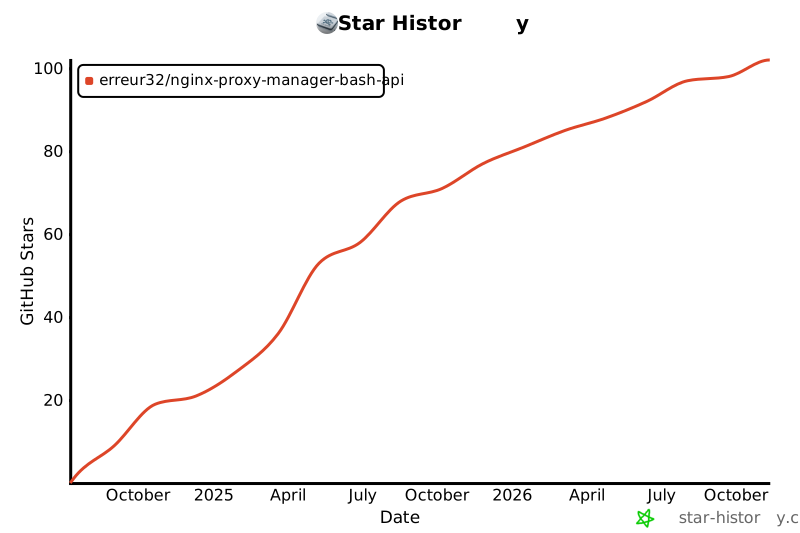
## Star History
[](https://www.star-history.com/?repos=Erreur32%2Fnginx-proxy-manager-Bash-API&type=date&legend=top-left)
## Credits & Thanks
Special thanks to:
- [@ichbinder](https://github.com/ichbinder) for implementing the `-y` parameter for automatic confirmations
- 🙏 **Special thanks to [zafar-2020](https://github.com/zafar-2020)** for his valuable help with testing and reporting issues during the development of version 3.0.0!
## License
MIT License - see the [LICENSE.md][license] file for details
[contributors]: https://github.com/Erreur32/nginx-proxy-manager-Bash-API/graphs/contributors
[erreur32]: https://github.com/Erreur32
[issue]: https://github.com/Erreur32/nginx-proxy-manager-Bash-API/issues
[license]: https://github.com/Erreur32/nginx-proxy-manager-Bash-API/blob/main/LICENSE.md
[maintenance-shield]: https://img.shields.io/maintenance/yes/2024.svg
[project-stage-shield]: https://img.shields.io/badge/project%20stage-stable-green.svg
[release-shield]: https://img.shields.io/badge/version-v3.6.9-blue.svg
[release]: https://github.com/Erreur32/nginx-proxy-manager-Bash-API/releases/tag/v3.6.9
[contributors-shield]: https://img.shields.io/github/contributors/Erreur32/nginx-proxy-manager-Bash-API.svg
[license-shield]: https://img.shields.io/github/license/Erreur32/nginx-proxy-manager-Bash-API.svg
[issues-shield]: https://img.shields.io/github/issues/Erreur32/nginx-proxy-manager-Bash-API.svg
[stars-shield]: https://img.shields.io/github/stars/Erreur32/nginx-proxy-manager-Bash-API.svg
[stars]: https://github.com/Erreur32/nginx-proxy-manager-Bash-API/stargazers
---
## 🙏 Acknowledgments
Special thanks to [@popy2k14](https://github.com/popy2k14) for identifying and reporting the certificate download issue in [PR #20](https://github.com/Erreur32/nginx-proxy-manager-Bash-API/pull/20). Their contribution helped improve the script's compatibility with newer NPM installations by highlighting the API changes and the need for fallback support.
Special thanks to the contributors of [PR #28](https://github.com/Erreur32/nginx-proxy-manager-Bash-API/pull/28) for fixing the `host_list` function to properly handle proxy hosts with multiple domain names. This critical bug fix ensures that the listing function works correctly when domain names contain spaces or when multiple domains are configured.
Special thanks to the contributors of [PR #29](https://github.com/Erreur32/nginx-proxy-manager-Bash-API/pull/29) for adding the TARGET column to the `host_list` output. This enhancement makes it much easier to see where each proxy host forwards traffic without needing to check individual host details.