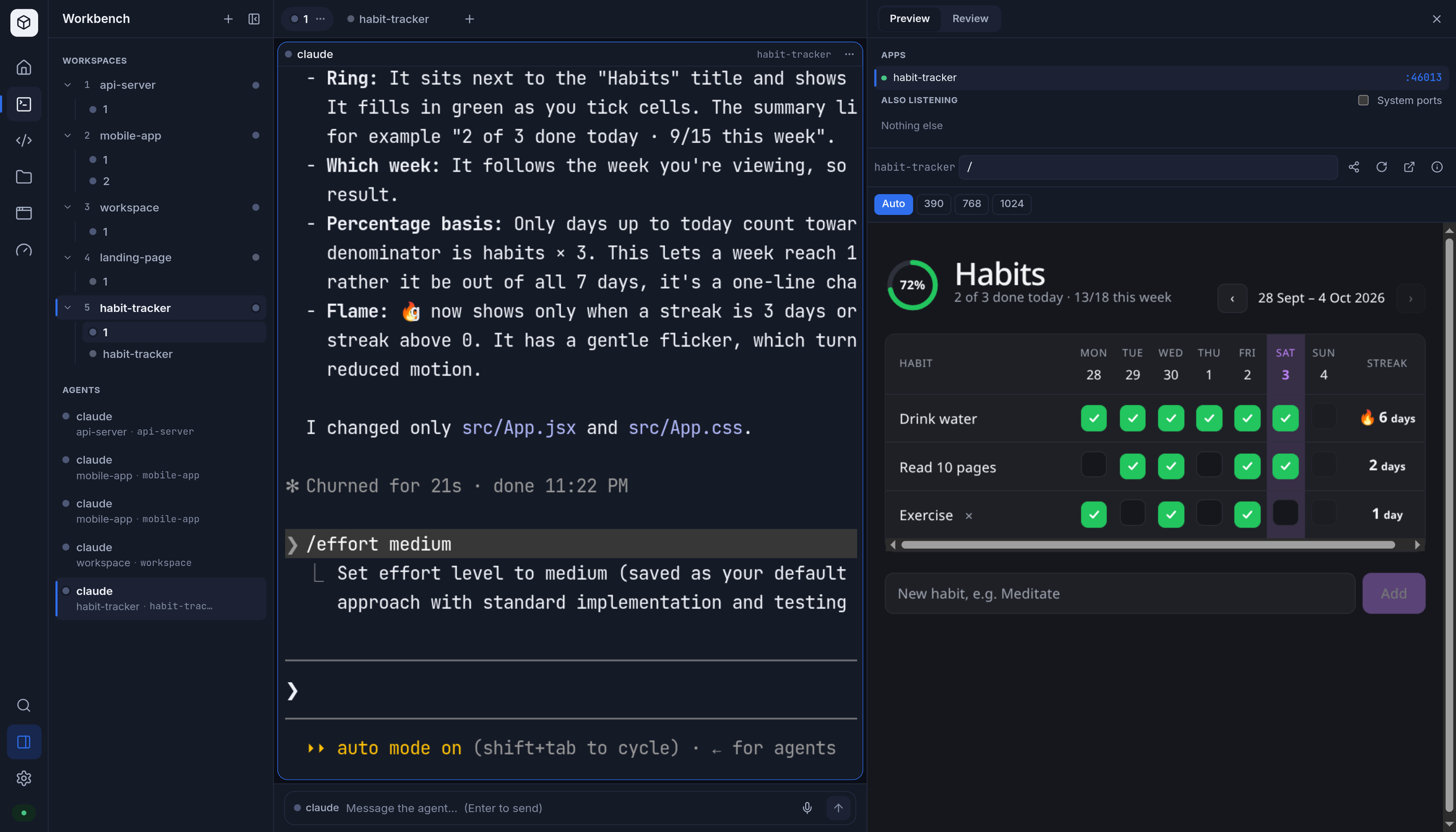
Agentbox: Self-Hosted Multi-Agent Workspace for Autonomous AI Development
Agentbox is an advanced, open-source orchestration platform designed specifically for developers who need to manage multiple AI coding agents in a persistent, self-hosted environment. Unlike standard local scripts that terminate when a local machine goes offline or enters sleep mode, Agentbox provides a dedicated infrastructure where agents like Claude Code and Codex can operate continuously on a VPS (Virtual Private Server) or a local server.
What is Agentbox?
Agentbox acts as a management layer for AI-driven development. It transforms the way developers interact with LLMs by providing a "workspace" rather than just a chat interface. By hosting agents on your own infrastructure, you create a 24/7 operational hub where complex tasks—such as large-scale refactoring, automated bug fixing, or continuous feature building—can proceed even while you are away from your primary device.
The platform is built with TypeScript and optimized for Docker deployment, making it highly portable across various Linux distributions and cloud providers like DigitalOcean, AWS, or Linode. It bridges the gap between raw CLI tools and a manageable production-ready environment by wrapping agentic workflows in a stable containerized ecosystem.
Core Features & Functionalities
Agentbox provides a suite of features designed to streamline the management of autonomous agents:
- Multi-Agent Orchestration: Manage a "team" of agents simultaneously. Each agent can be assigned specific roles or tools, allowing for collaborative workflows where different models (e.g., Claude 3.5 Sonnet via Claude Code and specialized Codex instances) work side-by-side in the same project context.
- Live Terminals: Every agent runs in a dedicated terminal environment accessible through a web-based dashboard. This allows you to monitor progress, intervene in real-time, or provide manual input from any device—be it a desktop browser, a mobile phone, or a remote terminal emulator.
- Shareable Previews: One of the standout features is the ability to generate unique links for live previews. When an agent builds a web application or a UI component, Agentbox provides a way to share that specific preview instantly with teammates or clients for immediate feedback without exposing the underlying infrastructure.
- Persistent Execution: By decoupling the execution from your local machine, Agentbox ensures that long-running tasks are not interrupted by network drops on your personal laptop or system restarts. The state of the agent's work is preserved within the containerized environment.
Technical Architecture & Infrastructure
Agentbox is designed with a modular architecture to handle the complexities of environment isolation and port management for multiple concurrent processes.
- Containerization: Native support for Docker and Docker Compose simplifies the deployment of the entire stack, including necessary dependencies for various agent types. This ensures that each agent has its own isolated environment while sharing a common infrastructure layer.
- Persistence Layer: Supports standard volume mapping to ensure that project files, configuration states, and local caches are preserved across restarts or container updates.
- Networking & Port Management: Manages internal routing so that multiple agents can run on different ports while remaining accessible through a unified gateway or specific mapped ports in the Docker network, preventing port collisions during multi-agent operations.
Use Cases & Target Audience
Agentbox is primarily targeted at Software Engineers, DevOps Specialists, and Indie Hackers who want to scale their development output using AI.
- Autonomous Development: Assign a complex task (e.g., "Migrate this entire API from Express to Fastify") and let the agents work overnight while you sleep.
- Remote Management: Monitor your agent's progress on a mobile device while commuting or away from your desk, receiving notifications when tasks are completed.
- Collaborative AI Workflows: Share preview links with stakeholders to see live updates of features being built by autonomous agents in real-time, accelerating the feedback loop.
Installation & Deployment
The recommended way to deploy Agentbox is via Docker Compose. This ensures that the environment variables, port mappings, and volume mounts are correctly configured for a production-ready VPS setup.
System Requirements:
- Operating System: Linux (Ubuntu/Debian recommended)
- Runtime: Docker & Docker Compose installed
- Connectivity: A stable internet connection for LLM API communication
- Hardware: Minimum 4GB RAM (recommended for running multiple concurrent agents and their associated environments)
Advantages vs. Limitations
Pros:
- True Autonomy: Decouples the AI's "thinking" and "acting" from your local hardware, allowing for 24/7 operation.
- Multi-Device Access: Seamless transition between mobile and desktop for monitoring agent progress via web terminals.
- Scalability: Easily add more agents as your project complexity grows by simply spinning up new containers.
Limitations:
- Setup Complexity: Requires basic knowledge of Docker and Linux to configure the initial environment variables and network rules.
- Resource Intensive: Running multiple active terminals and agent processes requires sufficient server resources (CPU/RAM) depending on the number of concurrent agents.
Frequently Asked Questions (FAQ)
Can I use my own API keys?
Yes, Agentbox allows you to configure your own environment variables for various providers including Anthropic, OpenAI, and others. This ensures you only pay for the tokens you consume.
Does it work with Claude Code specifically?
Yes, one of the primary use cases is providing a stable home for the Claude Code CLI tool within a managed workspace, allowing it to run independently of your local machine.
Is there a cloud version?
Agentbox is designed as a self-hosted solution. While you can host it on any cloud provider (like DigitalOcean or AWS), you are responsible for the instance management and configuration.
How does port mapping work for multiple agents?
Agentbox manages internal routing so that each agent can have its own unique environment while being accessible through a unified dashboard or specific mapped ports in the Docker network.
Related Resources
Explore more at Alternatives & Comparisons or visit our HostingByte Guides.