README.md
Rama main · réplica de lectura del repositorio original.
<!--
- SPDX-FileCopyrightText: 2016-2024 Nextcloud GmbH and Nextcloud contributors
- SPDX-FileCopyrightText: 2015-2015 ownCloud, Inc.
- SPDX-License-Identifier: AGPL-3.0-or-later
-->
# Nextcloud Calendar
[](https://api.reuse.software/info/github.com/nextcloud/calendar)


**A calendar app for [Nextcloud](http://nextcloud.com). Easily sync events from various devices with your Nextcloud and edit them online.**
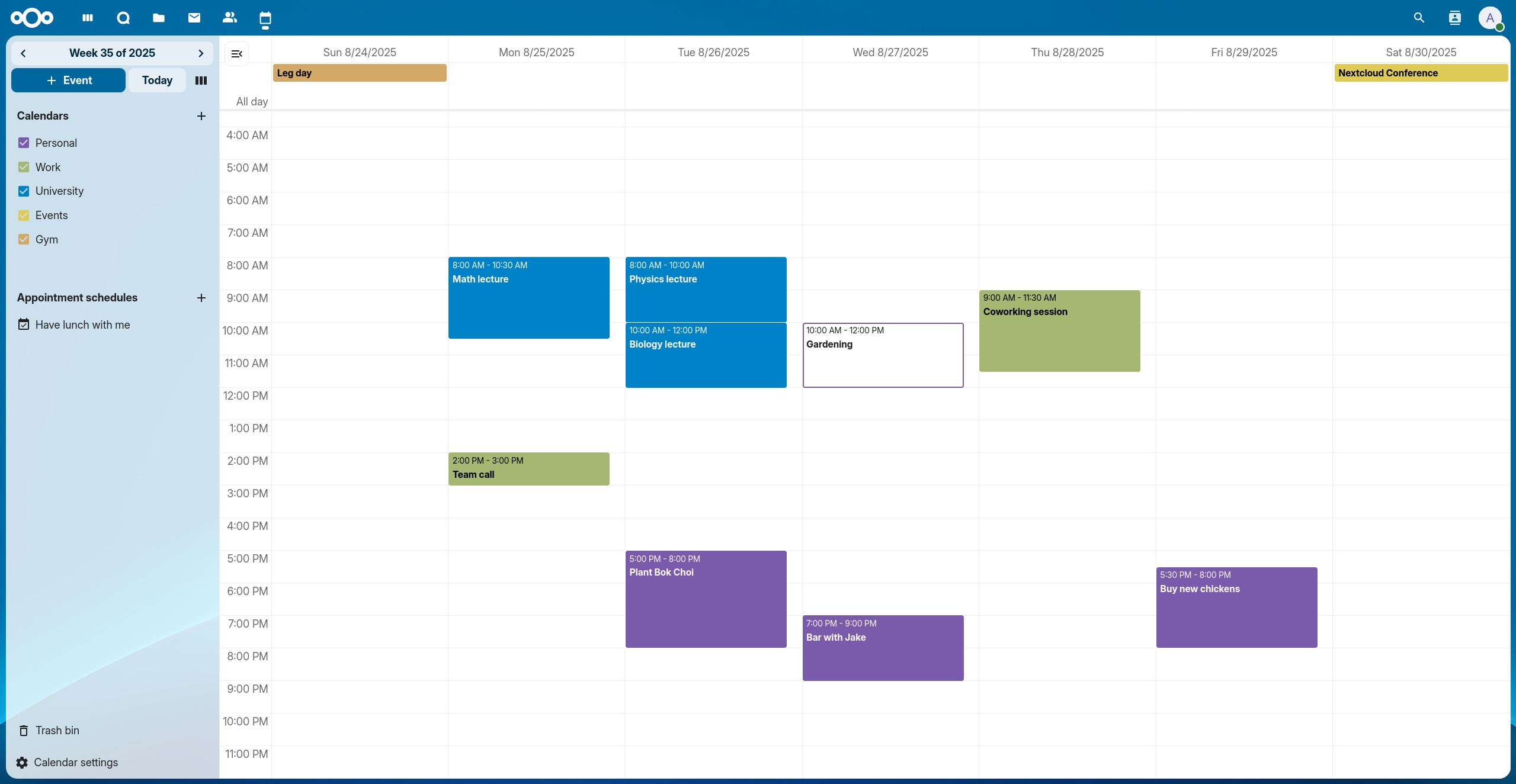
## :blue_heart: :tada: Why is this so awesome?
* :rocket: **Integration with other Nextcloud apps!** Like Contacts, Talk, Tasks, Deck and Circles
* :globe_with_meridians: **WebCal Support!** Want to see your favorite team's matchdays in your calendar? No problem!
* :raising_hand: **Attendees!** Invite people to your events
* :watch: **Free/Busy!** See when your attendees are available to meet
* :alarm_clock: **Reminders!** Get alarms for events inside your browser and via email
* :mag: **Search!** Find your events at ease
* :ballot_box_with_check: **Tasks!** See tasks or Deck cards with a due date directly in the calendar
* :speaker: **Talk rooms!** Create an associated Talk room when booking a meeting with just one click
* :calendar: **Appointment booking** Send people a link so they can book an appointment with you [using this app](https://apps.nextcloud.com/apps/appointments)
* :paperclip: **Attachments!** Add, upload and view event attachments
* :see_no_evil: **We’re not reinventing the wheel!** Based on the great [c-dav library](https://github.com/nextcloud/cdav-library), [ical.js](https://github.com/mozilla-comm/ical.js) and [fullcalendar](https://github.com/fullcalendar/fullcalendar) libraries.
## :hammer_and_wrench: Installation
The app is distributed through the [app store](https://apps.nextcloud.com/apps/calendar) and you can install it [right from your Nextcloud installation](https://docs.nextcloud.com/server/stable/admin_manual/apps_management.html).
Release tarballs are hosted at https://github.com/nextcloud-releases/calendar/releases.
## :satellite: Support
If you need assistance or want to ask a question about Calendar, you are welcome to [ask for support](https://help.nextcloud.com/c/apps/calendar) in our Forums.
If you have found a bug, feel free to open a new Issue on GitHub. Keep in mind, that this repository only manages the frontend.
If you find bugs or have problems with the CalDAV-Backend, you should ask the team at [Nextcloud server](https://github.com/nextcloud/server) for help!
## :earth_africa: Supported Browsers
* Chrome/Chromium 76+
* Edge 40+
* Firefox 60+
* Internet Explorer 11
* Safari 12.1+
## Maintainers
* [Nextcloud Groupware team](https://github.com/nextcloud/groupware/#members)
## Build the app
To build you will need to have [Node.js](https://nodejs.org/en/) and
[Composer](https://getcomposer.org/) installed.
- Install PHP dependencies: `composer install`
- Install JS dependencies: `npm ci`
- Build JavaScript for the frontend
- `npm run dev` development build
- `npm run watch` watch for changes
- `npm run build` production build
Read more about [necessary prerequisites](https://docs.nextcloud.com/server/latest/admin_manual/installation/source_installation.html#prerequisites-for-manual-installation) for manual installs.
## Running tests
You can run the following back-end and front-end tests by using:
```
composer test
npm run test
```
Front-end tests are split into unit tests ([Vitest](https://vitest.dev/)), component tests and end-to-end tests (both [Playwright](https://playwright.dev/)):
```sh
npm run test:unit # Vitest unit tests
npm run test:component # Playwright component tests
```
### Updating Playwright snapshots
Component tests compare screenshots against committed baseline snapshots. If your change intentionally alters
rendered output, regenerate them with:
```sh
npm run test:component:update-snapshots # regenerate component test snapshots
```
### Running the Playwright GUI in a container/remote environment
`npm run test:component:ui` and `npm run test:e2e:ui` open Playwright's UI mode, which normally launches a window on
your local machine. When running inside a devcontainer, Codespace, SSH remote, or any other headless environment, use the
`:remote` variants instead, which serve the UI over HTTP so it can be reached through a forwarded port in your local browser:
```sh
npm run test:component:ui:remote # component tests UI, served on port 13000
npm run test:e2e:ui:remote # end-to-end tests UI, served on port 13000
```
## :v: Code of conduct
The Nextcloud community has core values that are shared between all members during conferences,
hackweeks and on all interactions in online platforms including [Github](https://github.com/nextcloud) and [Forums](https://help.nextcloud.com).
If you contribute, participate or interact with this community, please respect [our shared values](https://nextcloud.com/code-of-conduct/). :relieved:
## :heart: How to create a pull request
This guide will help you get started:
- :dancer: :smile: [Opening a pull request](https://opensource.guide/how-to-contribute/#opening-a-pull-request)
Commits in this repository follow the [Conventional Commits specification](https://www.conventionalcommits.org/en/v1.0.0/#summary).