🌊 bittorrent-tracker
Simple, robust BitTorrent tracker (client & server) implementation

Node.js implementation of a BitTorrent tracker, client and server.
A BitTorrent tracker is a web service which responds to requests from BitTorrent clients. The requests include metrics from clients that help the tracker keep overall statistics about the torrent. The response includes a peer list that helps the client participate in the torrent swarm.
This module is used by WebTorrent.
Features
- Includes client & server implementations
- Supports all mainstream tracker types:
- HTTP trackers
- UDP trackers (BEP 15)
- WebTorrent trackers (BEP forthcoming)
- Supports ipv4 & ipv6
- Supports tracker "scrape" extension
- Robust and well-tested
- Comprehensive test suite (runs entirely offline, so it's reliable)
- Used by popular clients: WebTorrent, peerflix, and playback
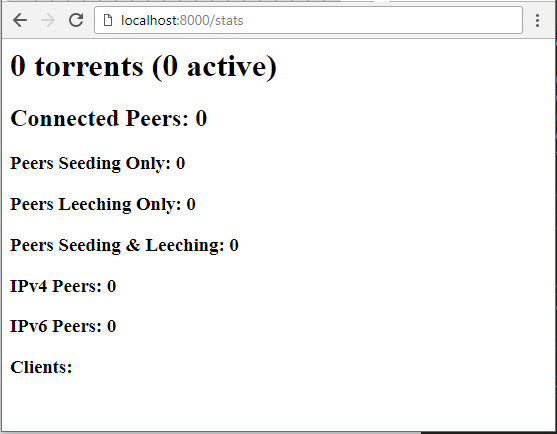
- Tracker statistics available via web interface at
/statsor JSON data at/stats.json
Also see bittorrent-dht.
Tracker stats

Install
npm install bittorrent-trackerUsage
Client
To connect to a tracker, just do this:
import Client from 'bittorrent-tracker'

const requiredOpts = {
  infoHash: new Buffer('012345678901234567890'), // hex string or Buffer
  peerId: new Buffer('01234567890123456789'), // hex string or Buffer
  announce: [], // list of tracker server urls
  port: 6881 // torrent client port, (in browser, optional)
}

const optionalOpts = {
  // RTCPeerConnection config object (only used in browser)
  rtcConfig: {},
  // User-Agent header for http requests
  userAgent: '',
  // Custom webrtc impl, useful in node to specify [wrtc](https://npmjs.com/package/wrtc)
  wrtc: {},
  getAnnounceOpts: function () {
    return {
      uploaded: 0,
      downloaded: 0,
      left: 0,
      customParam: 'blah' // custom parameters supported
    }
  },
  // Proxy options (used to proxy requests in node)
  proxyOpts: {
    socksProxy: new SocksProxy(socksOptionsObject),
    httpAgent: new http.Agent(agentOptionsObject),
    httpsAgent: new https.Agent(agentOptionsObject)
  }
}

const client = new Client(requiredOpts)

client.on('error', function (err) {
  console.log(err.message)
})

client.on('warning', function (err) {
  console.log(err.message)
})

// start getting peers from the tracker
client.start()

client.on('update', function (data) {
  console.log('got an announce response from tracker: ' + data.announce)
  console.log('number of seeders in the swarm: ' + data.complete)
  console.log('number of leechers in the swarm: ' + data.incomplete)
})

client.once('peer', function (addr) {
  console.log('found a peer: ' + addr)
})

// announce that download has completed (and you are now a seeder)
client.complete()

// force a tracker announce. will trigger more 'update' events and maybe more 'peer' events
client.update()

// provide parameters to the tracker
client.update({
  uploaded: 0,
  downloaded: 0,
  left: 0,
  customParam: 'blah'
})

// stop getting peers from the tracker, gracefully leave the swarm
client.stop()

// ungracefully leave the swarm (without sending final 'stop' message)
client.destroy()

// scrape
client.scrape()

client.on('scrape', function (data) {
  console.log('got a scrape response from tracker: ' + data.announce)
  console.log('number of seeders in the swarm: ' + data.complete)
  console.log('number of leechers in the swarm: ' + data.incomplete)
  console.log('number of total downloads of this torrent: ' + data.downloaded)
})
Server
To start a BitTorrent tracker server to track swarms of peers:
import { Server } from 'bittorrent-tracker'
// Or import Server from 'bittorrent-tracker/server'

const server = new Server({
  udp: true, // enable udp server? [default=true]
  http: true, // enable http server? [default=true]
  ws: true, // enable websocket server? [default=true]
  stats: true, // enable web-based statistics? [default=true]
  trustProxy: false, // enable trusting x-forwarded-for header for remote IP [default=false]
  filter: function (infoHash, params, cb) {
    const allowed = (infoHash === 'aaa67059ed6bd08362da625b3ae77f6f4a075aaa')
    if (allowed) {
      cb(null)
    } else {
      cb(new Error('disallowed torrent'))
    }
  }
})

// Internal http, udp, and websocket servers exposed as public properties.
server.http
server.udp
server.ws

server.on('error', function (err) {
  console.log(err.message)
})

server.on('warning', function (err) {
  console.log(err.message)
})
Releases
- v11.2.3 (2026-05-25) - Bug Fixes: deps: update dependency bittorrent-peerid to v2 (#576)
- v11.2.2 (2025-09-06) - Bug Fixes: export WebSocketTracker (#558)
- v11.2.1 (2025-01-19) - Bug Fixes: http announce no left (#548)
- v11.2.0
- v11.1.2
- v11.1.1
- v11.1.0
- v11.0.2
- v11.0.1
- v11.0.0
Deployment Notes
Para despliegue en producción, existen imágenes Docker oficiales y alternativas:
- Quoorex/docker-bittorrent-tracker
- jarylc/bittorrent-tracker - Minimal multiarch Alpine image
- siestacat/bittorrent-tracker
Alternativas y Comparativa
- OpenTracker - Tracker con soporte nativo para WebTorrent
- Transmission RPC - Para integración con Transmission
- Deluge - Cliente con tracker integrado
FAQ
¿Qué es bittorrent-tracker?
Es una implementación open source de BitTorrent tracker, client y server escrita en Node.js que permite crear servidores de tracking para torrents.
¿Para quién está diseñado?
Desarrolladores que necesitan implementar trackers personalizados, proyectos WebTorrent, aplicaciones P2P y sistemas de distribución de contenido.
¿Cómo instalarlo?
npm install bittorrent-tracker¿Soporta Docker?
Sí, existen múltiples imágenes Docker disponibles. Ver sección Deployment Notes.
¿Qué protocolos soporta?
HTTP trackers, UDP trackers (BEP 15), WebTorrent trackers (BEP forthcoming).
Verificación
Fecha de verificación: 2026-10-05
Fuentes primarias: GitHub webtorrent/bittorrent-tracker, npmjs.com, Docker Hub
Repositorio oficial: https://github.com/webtorrent/bittorrent-tracker