README.md
Rama main · réplica de lectura del repositorio original.
# asterisk-ai-voice-agent
[](https://github.com/ictinnovations/asterisk-ai-voice-agent/actions)
[](https://pypi.org/project/asterisk-ai-voice-agent/)
[](./LICENSE)
Put an AI agent on the phone. Asterisk bridges a live call to this sidecar over [AudioSocket](https://docs.asterisk.org/Configuration/Channel-Drivers/AudioSocket/), and the sidecar runs a streaming speech-to-text → LLM → text-to-speech loop, so the caller has an actual back-and-forth conversation, interruptions and all. It's self-hosted: your PBX, your API keys, your prompts, no per-minute SaaS in the middle.
```
┌────────┐ RTP ┌──────────┐ AudioSocket (TCP) ┌───────────────────────┐
│ Caller │◀───────▶│ Asterisk │◀───────────────────▶│ ai-voice-agent │
└────────┘ └──────────┘ slin 8 kHz │ STT → LLM → TTS loop │
│ + tool calling │
└───────────┬───────────┘
Whisper/Scribe · Claude · Piper/ElevenLabs
```
## What you get
- **Speech in** via OpenAI Whisper, ElevenLabs Scribe, or 60db, with WebRTC VAD deciding when you've stopped talking.
- **The brain** is Anthropic Claude, streamed token-by-token so the agent starts replying before the whole answer is ready. Swapping in another LLM means implementing one small module interface, documented in [PORTING.md](./PORTING.md).
- **Speech out** via [Piper](https://github.com/rhasspy/piper), which runs locally and costs nothing, or ElevenLabs if you want their voices. Either way it's resampled to the 8 kHz slin that Asterisk expects.
- **Barge-in.** Start talking and the agent shuts up, like a real conversation.
- **Tool calling.** Let the model transfer the call, schedule a callback, look something up in your CRM. Calls go out to a webhook you control, so the actual logic stays in your stack.
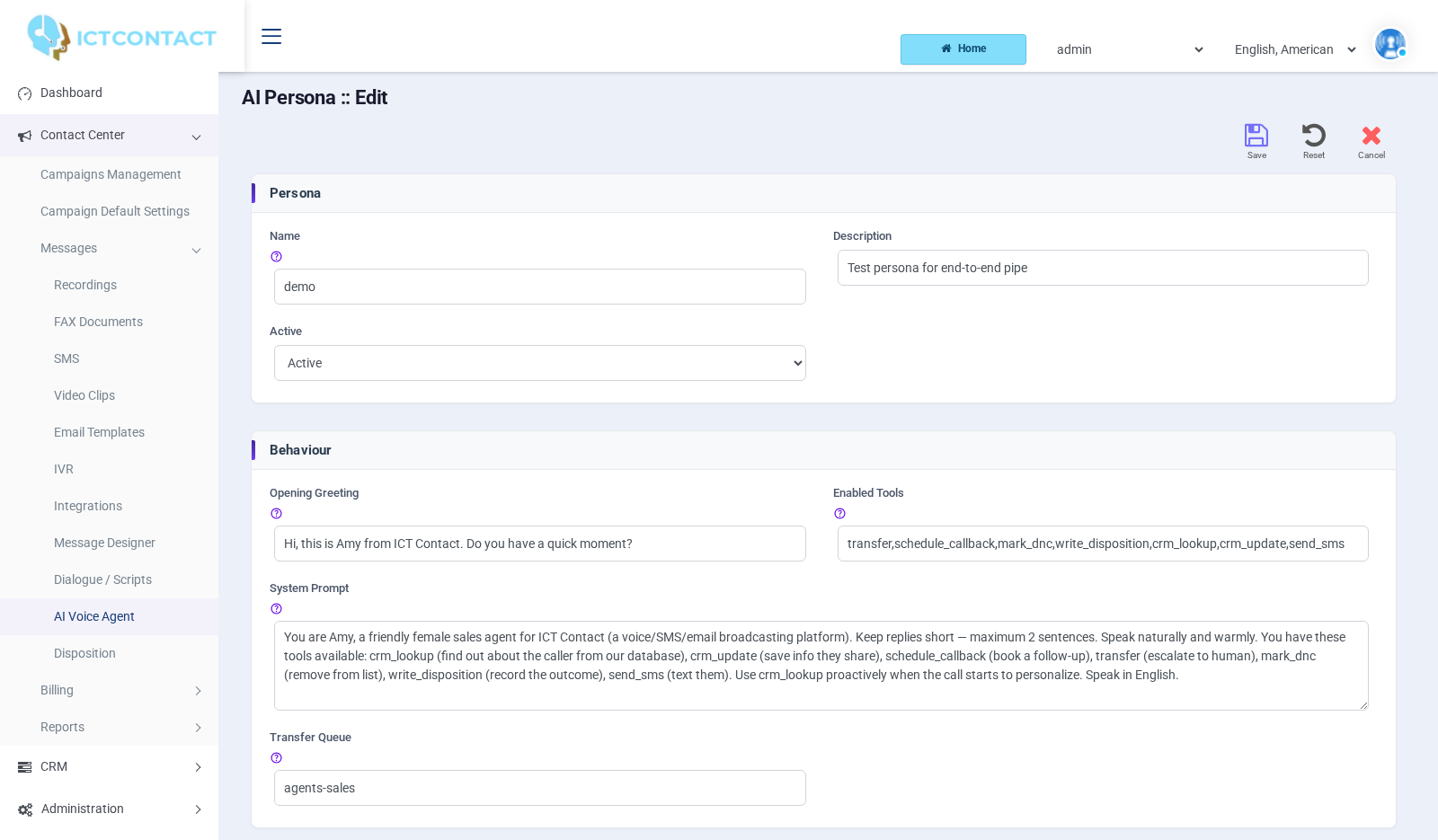
- **Personas** are just YAML: a greeting, a system prompt, which voice, which model, which tools.
- **The pacing is handled.** This is the part everyone gets wrong the first time (more below).
- Runs in Docker. `docker compose up`, point Asterisk at it, done.
## How it works
1. Your dialplan answers a call and runs `AudioSocket(<uuid>,<host>:9092)`, passing a persona name via a channel variable.
2. The sidecar accepts the AudioSocket connection, reads the UUID frame, and loads that persona from `personas.yaml`.
3. It speaks the greeting (TTS → AUDIO frames), then loops: caller audio → STT → on a final transcript, stream the LLM reply → buffer to sentence boundaries → TTS → paced AUDIO frames back.
4. If the LLM emits a `tool_use`, the sidecar POSTs it to your configured **tools webhook**, feeds the result back, and continues.
5. On hangup it tears the call down and (optionally) POSTs a transcript to your webhook.
The AudioSocket framing/pacing lives in a standalone, tested package: [`asterisk-audiosocket`](https://www.npmjs.com/package/asterisk-audiosocket) (Node/TypeScript), and in [`asterisk_ai_voice_agent/audiosocket.py`](./asterisk_ai_voice_agent/audiosocket.py) here (Python). Same wire protocol, pick your language.
### chan_websocket (optional, Asterisk 20.18+ / 22.8+)
AudioSocket is the default and needs no extra config. If you're on a new enough Asterisk you can use `chan_websocket` instead by uncommenting `websocket_port` in `config.yaml`. Both transports can run at once.
The difference that matters is who owns the playout clock. Under AudioSocket we own it, so queue depth sets the barge-in floor and we meter every frame. Under `chan_websocket` Asterisk owns it and `FLUSH_MEDIA` takes queued audio back, so the sidecar buffers 2 s ahead and still cuts off instantly when the caller interrupts. Measured on 22.10.1: 18 s queued, flushed after 2 s, and not one flushed byte reached the caller.
Two things to get right, both of which fail quietly otherwise:
```ini
; chan_websocket.conf — the driver defaults to a plain-text format we don't parse
[global]
control_message_format = json
```
```
; The dial string must carry the call id. chan_websocket has no UUID frame, and
; the connection_id in websocket_client.conf is the same on every call.
; Commas become '&' in the query string, because Dial() reads '&' as more channels.
same = n,Dial(WebSocket/conn1/c(slin),v(uuid=${CALLUUID}))
```
The id arrives with the HTTP handshake, i.e. *before* any media, so an unregistered call is refused before a pipeline is ever built. Channel variables also reach the sidecar in `MEDIA_START`, but note that `Set(__FOO=x)` arrives under the literal key `__FOO`, prefix included; `Set(_FOO=x)` arrives as `FOO`.
> **A word on pacing.** `app_audiosocket` shoves each AUDIO frame at the channel the moment it arrives. So if you synthesize a sentence and write it all at once, you overrun the far end's jitter buffer and the caller hears only the tail of every phrase, which is baffling until you figure out why. The sidecar meters outbound audio to the 20 ms frame clock and re-clamps the deadline every frame, so a slow TTS response can't make it burst to catch up. We learned this one the hard way in production; if you roll your own, steal this bit.
## Quick start (Docker)
```bash
git clone https://github.com/ictinnovations/asterisk-ai-voice-agent
cd asterisk-ai-voice-agent
cp config.example.yaml config.yaml # add your API keys
cp personas.example.yaml personas.yaml # define your agent(s)
docker compose up -d
```
## Quick start (pip)
Piper's phonemizer needs `espeak-ng` on the host, so install that first.
```bash
sudo apt-get install -y espeak-ng
pip install asterisk-ai-voice-agent
cp config.example.yaml config.yaml
cp personas.example.yaml personas.yaml
AI_AGENT_CONFIG=config.yaml AI_AGENT_PERSONAS=personas.yaml asterisk-ai-voice-agent
```
## Running as a systemd service
For a pip install on a host that isn't running Docker, [`packaging/systemd/asterisk-ai-voice-agent.service`](./packaging/systemd/asterisk-ai-voice-agent.service) runs the sidecar as an unprivileged system user:
```bash
sudo useradd --system --no-create-home --shell /usr/sbin/nologin aivoiceagent
# Config holds API keys, so keep it root-owned and group-readable only.
sudo install -d -m 0750 -o root -g aivoiceagent /etc/asterisk-ai-voice-agent
sudo install -m 0640 -o root -g aivoiceagent \
config.example.yaml /etc/asterisk-ai-voice-agent/config.yaml
sudo install -m 0640 -o root -g aivoiceagent \
personas.example.yaml /etc/asterisk-ai-voice-agent/personas.yaml
sudo install -m 0644 packaging/systemd/asterisk-ai-voice-agent.service \
/etc/systemd/system/
sudo systemctl daemon-reload
sudo systemctl enable --now asterisk-ai-voice-agent
```
Logs go to the journal: `journalctl -u asterisk-ai-voice-agent -f`. Startup takes a few seconds before the ports bind, because importing numpy and the provider SDKs dominates it.
If you installed into a virtualenv rather than system-wide, point `ExecStart=` at that interpreter's `asterisk-ai-voice-agent`. Piper voices download into `/var/lib/asterisk-ai-voice-agent/voices`, which systemd creates via `StateDirectory=`; that is the only path the service can write to. The unit sets `ProtectSystem=strict`, so `/etc/asterisk-ai-voice-agent` stays read-only to the running process.
Add to your Asterisk `extensions.conf`:
```asterisk
#include "ai-voice-agent.conf"
```
Copy [`asterisk/ai-voice-agent.conf`](./asterisk/ai-voice-agent.conf) into `/etc/asterisk/` and `dialplan reload`, then test. This rings your SIP phone and, when you answer, drops you into the **demo** persona:
```bash
# Replace PJSIP/1001 with your own endpoint (e.g. SIP/1001, PJSIP/myphone).
asterisk -rx 'originate PJSIP/1001 extension demo@ai-agent-test'
```
Answer the phone and talk to the agent. To route real traffic, point any inbound DID, queue, or extension at the bridge:
```asterisk
exten => _X.,1,Set(PERSONA=support)
same => n,Goto(ai-agent-bridge,s,1)
```
## Persona config
```yaml
# personas.yaml
demo:
greeting: "Hi! Thanks for calling. How can I help you today?"
system_prompt: |
You are a friendly, concise phone assistant for Acme Corp.
Keep answers short and natural for speech. Never invent facts.
llm_provider: anthropic
llm_model: claude-sonnet-4-6
llm_temperature: 0.4
stt_provider: openai # Whisper
stt_language: en
tts_provider: piper # or elevenlabs
tts_voice_id: en_US-amy-medium
interrupt_enabled: true # barge-in
max_call_seconds: 900
tools_enabled: [transfer, schedule_callback] # posted to your webhook
```
## Requirements
- **Asterisk 18+** built with `app_audiosocket` / `res_audiosocket`.
- **Python 3.10+** (or just Docker).
- API keys for your chosen providers. Piper TTS is fully local (no key, no cloud).
## Configuration
`config.yaml` holds infrastructure + keys; `personas.yaml` holds agents. See the `*.example.yaml` files for the full annotated schema. Key sections:
| Section | Purpose |
|---------|---------|
| `listen` | Host/port the AudioSocket server binds (default `127.0.0.1:9092`). |
| `providers` | API keys for anthropic / openai / elevenlabs / sixtydb; Piper voice dir. |
| `tools.webhook_url` | Where `tool_use` calls and transcripts are POSTed. Omit to disable tools. |
| `limits.max_concurrent_calls` | Concurrency cap (each call ~150 MB during synthesis). |
### 60db transcription
[60db](https://docs.60db.ai) exposes a workspace-authenticated speech-to-text API.
To use it for a persona, set `providers.sixtydb.api_key` in `config.yaml`, then:
```yaml
stt_provider: sixtydb # 60db works too
stt_language: en # or auto for language detection
```
This sends your callers' audio to 60db, so check your consent and data-retention
rules before you turn it on.
The provider uploads the existing VAD-buffered mono 8 kHz WAV to `POST /stt`.
It produces one final transcript per utterance; `stt_model` is ignored because
the service chooses the transcription model. Lookback, silence handling and
transcript plausibility filtering still run locally. TTS is configured separately.
If `providers.openai.api_key` is configured, failed requests fall back to Whisper
for that utterance. Authentication failures (401/403) disable 60db attempts for
the rest of the call. Without an OpenAI key, failed utterances produce no
transcript. Successful empty transcripts do not trigger fallback. No automatic
60db retries are made. Requests use a 15-second HTTP timeout (5 seconds to
connect); transcript responses are limited to 1 MiB. A missing 60db key prevents
that persona's pipeline from starting.
## Latency and network tuning
The sidecar sets `TCP_NODELAY` on every accepted AudioSocket connection, so there's nothing to configure. Outbound audio is one 320-byte frame every 20 ms, and Nagle's algorithm holds writes that small back waiting for more data to coalesce with, which is the opposite of what a paced audio stream wants.
If Asterisk and the sidecar run on the same box over loopback, that's the whole story. Across a network, one kernel knob is worth knowing about:
```sh
# Corking can still batch small writes together even with TCP_NODELAY set.
sysctl -w net.ipv4.tcp_autocorking=0
```
We haven't benchmarked that one, so measure before you keep it. Ignore the older `net.ipv4.tcp_low_latency` advice you'll find in forum posts; the knob was removed in Linux 4.14 and does nothing today.
## Tool calling (webhook contract)
When the LLM calls a tool, the sidecar POSTs:
```json
{ "session": "<uuid>", "tool": "transfer", "args": { "target": "queue:sales" } }
```
Your endpoint returns a JSON result, which is fed back to the LLM as the tool result. Implement transfer/CRM/scheduling however your stack does it. (In ICTContact these map to Asterisk AMI redirects, spool updates, and CRM connectors.)
## Troubleshooting
| Symptom | Likely cause / fix |
|---------|--------------------|
| `AudioSocket` fails / call drops immediately | Asterisk lacks the module. `asterisk -rx 'module show like audiosocket'`. You need `app_audiosocket.so` + `res_audiosocket.so` (Asterisk 18+). |
| Call connects but the agent is **silent** | Persona not found (check the sidecar log for `no persona … dropping call`), or TTS not ready, with no Piper voice in `./voices` (`./download_voices.sh en_US-amy-medium`), or a bad/empty LLM API key. |
| Agent speaks but audio is **choppy / only the tail of each phrase** | Outbound pacing broken. Do **not** write TTS frames unpaced. Use the metered writer (`AudioSocketTransport.play` in `transport.py`). This is the #1 AudioSocket mistake. |
| Call drops instantly, log says `rejecting unregistered UUID` | The dialplan pre-register curl didn't reach the sidecar, so the UUID isn't on the allowlist. Confirm `register_port` (default 9091) is reachable from Asterisk and not firewalled; check for the `register` line in the sidecar log. Since 0.1.2 an unregistered UUID is dropped rather than served the `demo` persona. |
| Remote Asterisk can't reach the sidecar | Set `listen.host: 0.0.0.0` in `config.yaml`, publish ports instead of `network_mode: host`, and **firewall 9091/9092**. Never expose them publicly. |
| Barge-in doesn't interrupt | `interrupt_enabled: true` on the persona, and your `stt.is_speech()` VAD must return `True` on caller speech. |
| Transcripts start **mid-word** | The VAD's onset lag was dropping the head of the first word. Fixed by the 300 ms lookback buffer (`LOOKBACK_MS` in `stt.py`); raise it if your callers are still being clipped. |
| Tools do nothing | `tools.webhook_url` unset, or the persona's `tools_enabled` is empty, or the named tool isn't in `TOOL_SPECS` (`tools.py`). |
Logs: set `AI_AGENT_LOG=DEBUG` (env or compose) for per-frame detail.
## What it looks like with a UI
This project is a headless sidecar. You configure it with YAML and there's nothing to log into, by design.
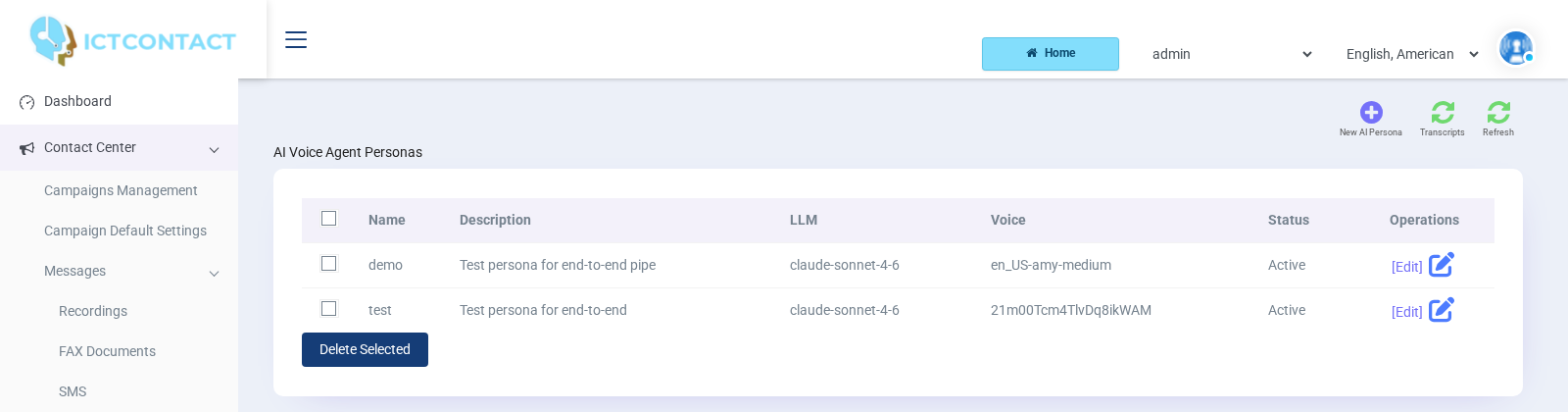
The screenshots below come from [ICTContact](https://www.ictcontact.com), the commercial platform this agent was pulled out of. They show the same persona model that `personas.yaml` describes here, so they're a useful map of what the fields mean in practice, and of what a front end over this sidecar can look like if you build one.
A persona carries a greeting, a system prompt and the toolbelt the model is allowed to reach for. Those map one to one onto `greeting`, `system_prompt` and `tools_enabled` in the YAML.
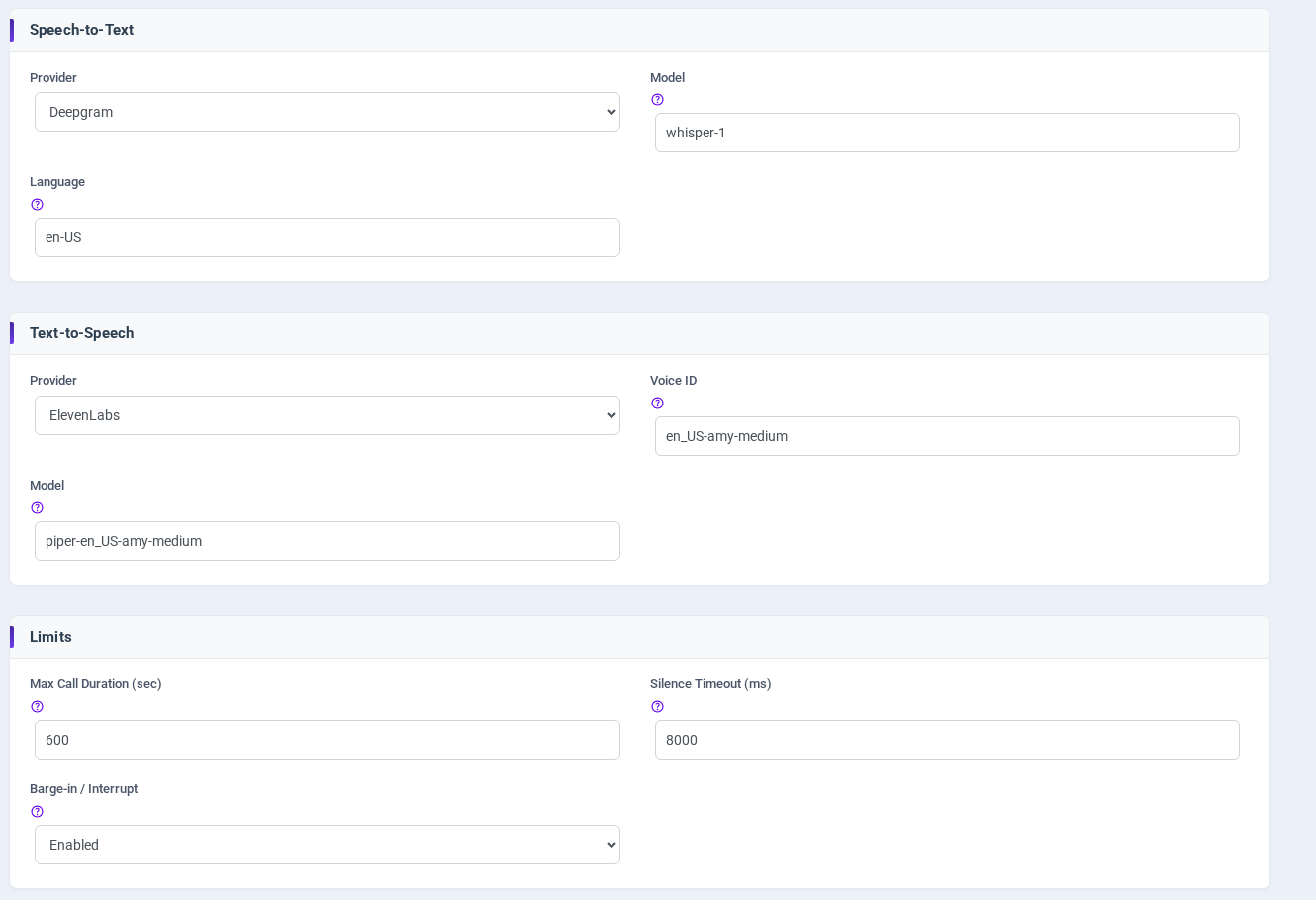
Speech-to-text, text-to-speech, call limits and barge-in are per persona too, so one number can answer with a local Piper voice and another with ElevenLabs.
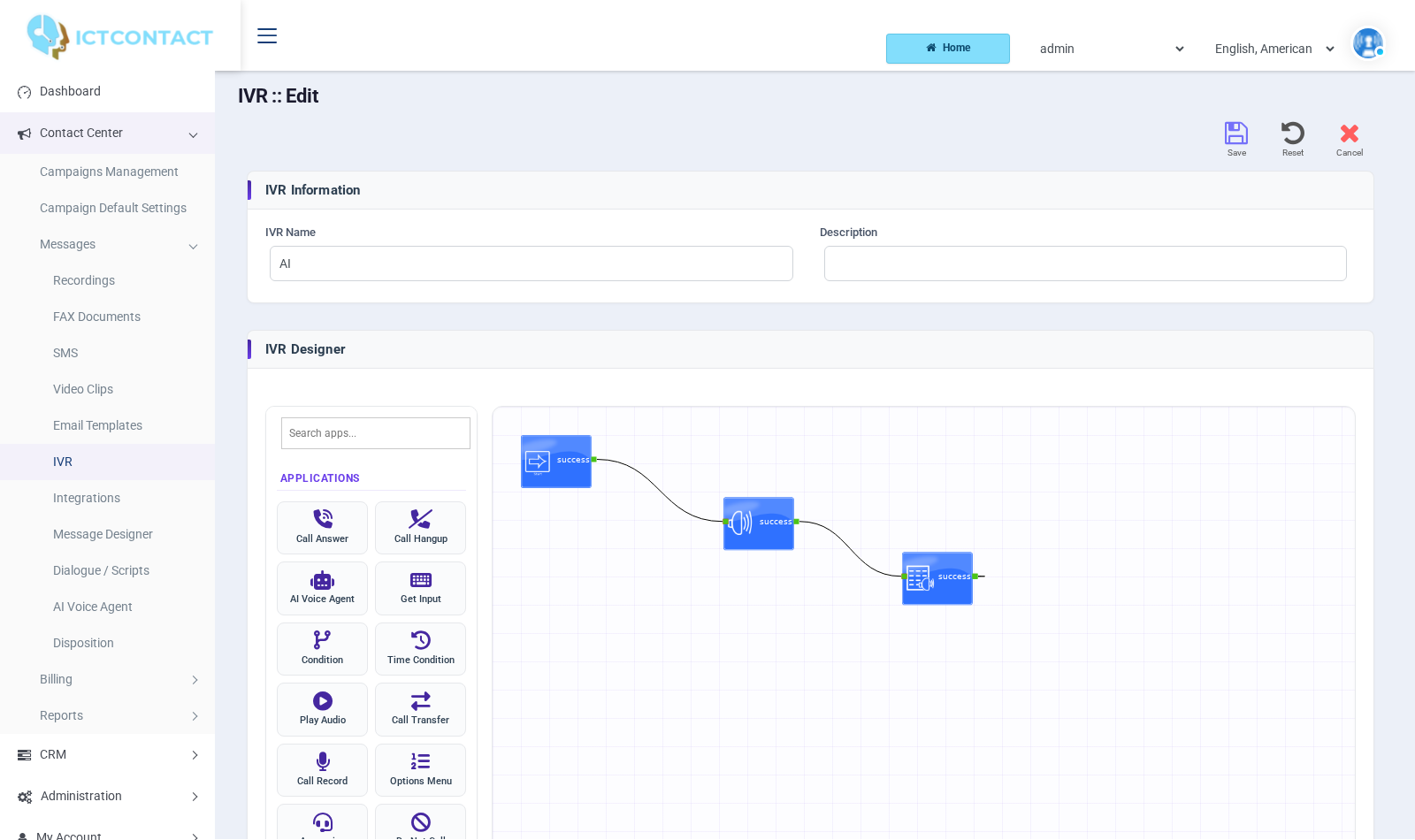
In ICTContact the agent is a node in the IVR designer, so a menu option hands the caller over and the agent hands back. You get the same effect from the dialplan here: route to `AudioSocket()` when you want the agent, and let it transfer out through the `transfer` tool.
## Related open source
- **[asterisk-audiosocket](https://github.com/ictinnovations/asterisk-audiosocket)** - the AudioSocket protocol layer on its own, in TypeScript. Prefer Node over Python? Build the agent in whatever language you like.
- **[asterisk-ami-node](https://github.com/ictinnovations/asterisk-ami-node)** - Asterisk Manager Interface client, zero dependency. This is what you reach for to implement the `transfer` tool.
- **[freeswitch-esl-node](https://github.com/ictinnovations/freeswitch-esl-node)** - the same idea for the FreeSWITCH Event Socket.
- **[pbx-mcp](https://github.com/ictinnovations/pbx-mcp)** - a Model Context Protocol server that gives AI assistants a read-only window into Asterisk and FreeSWITCH.
- **[ICTCore](https://github.com/ictinnovations/ictcore)** - the open source telephony framework behind our products.
## Provenance & credits
This started life inside [ICTContact](https://www.ictcontact.com), our commercial Voice/Fax/SMS/Email broadcasting and contact-center platform, where the same pipeline runs the AI Voice Agent and live voice-translation features. We pulled out the reusable core, cut the platform-specific parts (multi-tenancy, billing, our internal REST layer), and opened it up so you don't have to build the AudioSocket-to-LLM plumbing from scratch.
Maintained by [ICT Innovations](https://www.ictinnovations.com) and [ICT Vision](https://ict.vision), who have been shipping open source and commercial telephony since 2005. Written by Tahir Almas.
If this is useful to you, the wider stack behind it might be too:
- **[ICTPBX](https://ictpbx.com)** - white label multi tenant IP PBX, with a free community edition on GitHub
- **[ICTContact](https://ictcontact.com)** - contact center and unified communications, where this agent came from
- **[ICTDialer](https://ictdialer.com)** - auto and predictive dialer
- **[ICTFax](https://ictfax.org)** - open source fax server
Questions about the commercial products go through [the ICT Innovations support portal](https://service.ictinnovations.com/contact.php). Issues and pull requests about this project belong on GitHub, where everyone can read the answer.
## Commercial support and implementation
This project is MIT and stays that way. Everything you need to run it yourself is
here, and questions asked as GitHub issues get answered in public, where the next
person to hit the same thing can find them.
If you'd rather not do the integration work, we do it for a living. ICT Innovations
built this agent for ICTContact and deploys it against other people's Asterisk and
FreeSWITCH installs:
- **Audit** - we call your existing agent and measure what a caller actually hears:
latency at each stage, barge-in behaviour, where it breaks.
- **Pilot** - three weeks, one use case, against targets agreed before we start.
- **Implementation** - CRM integration, dialplan work, transfers, reporting.
- **Managed** - we keep it running and tuned as call patterns shift.
Details and pricing: <https://ictinnovations.com/ai-voice-agent-services/>
None of this is required to use the project, and nothing is held back from the open
source build to sell you later.
## License
[MIT](./LICENSE). © Tahir Almas / ICT Innovations, derived from ICTContact.